
LearnGuides
Cold Email Infrastructure Setup: Complete Guide (2026)

By Saksham JainPublished on: Mar 30, 2026 · 14 min read · Last reviewed: Mar 2026
TL;DR
The complete guide to setting up cold email infrastructure from scratch. Domains, DNS records, mailboxes, warmup, monitoring, and sequencer integration. everything you need in one place.
Cold email infrastructure has five layers, and skipping any single layer compromises everything above it. A $50,000 outreach campaign can fail because of a missing DMARC record.
| Layer | What It Is | Why It Matters | InboxKit Cost |
|---|---|---|---|
| 1. Domains | The foundation of your sending identity | Each domain handles ~50 emails/day safely | Starting at $2/year |
| 2. DNS Records | SPF, DKIM, DMARC, MX authentication | Without all four, emails land in spam | Included (automated) |
| 3. Mailboxes | Google Workspace, Microsoft 365, or Azure accounts | Real accounts get 20+ points better inbox placement than shared IPs | Google $2.50/mo (annual), Microsoft $2.50/mo, Azure $30/tenant |
| 4. Warmup | Building sender reputation before campaigns | Skipping warmup = 54% inbox placement vs 88% with proper warmup | $3/mailbox/mo |
| 5. Monitoring | Ongoing health checks and deliverability tracking | Catches blacklists, DNS changes, and reputation drops before they kill campaigns | InfraGuard (per-domain pricing) |
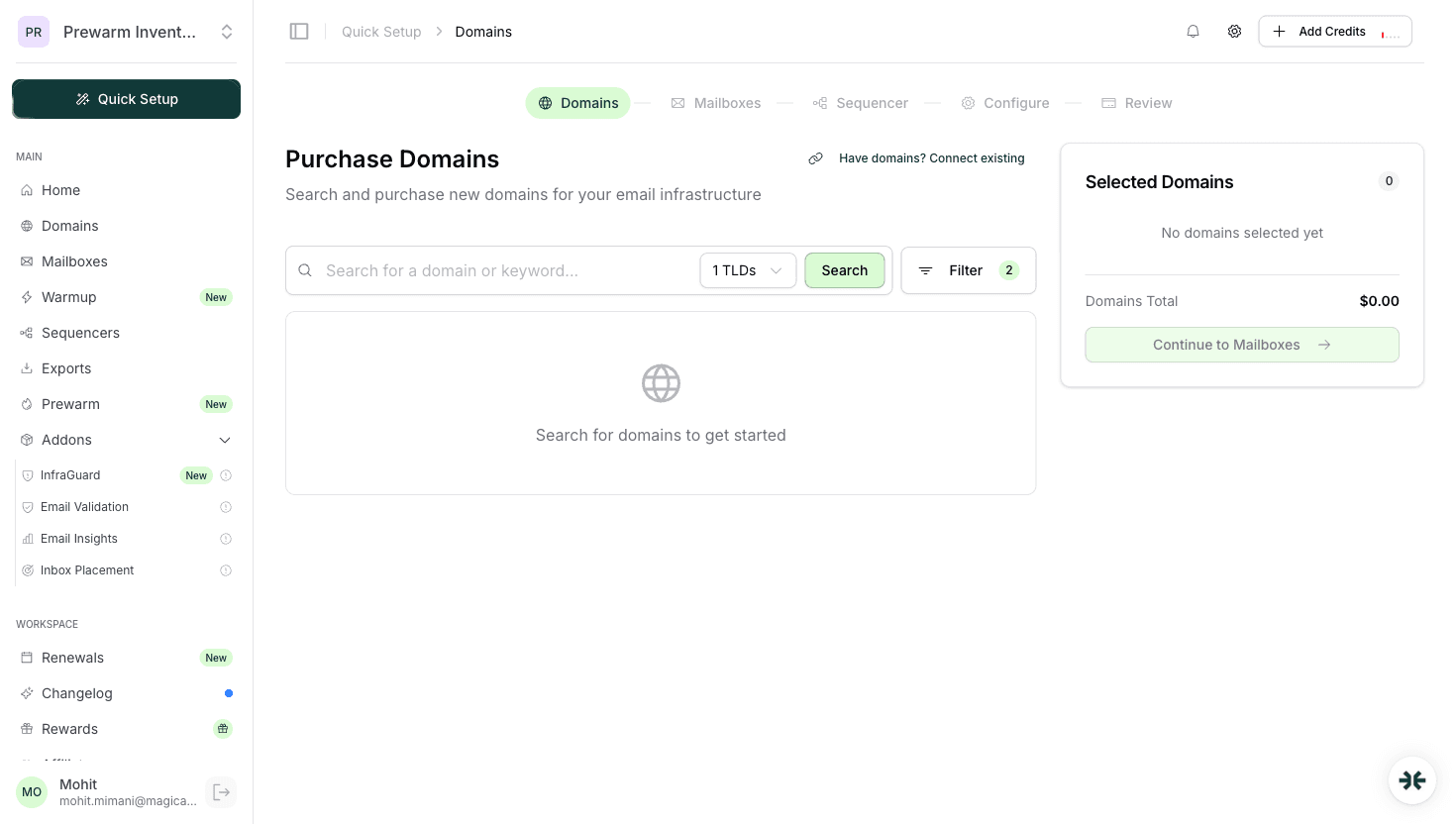
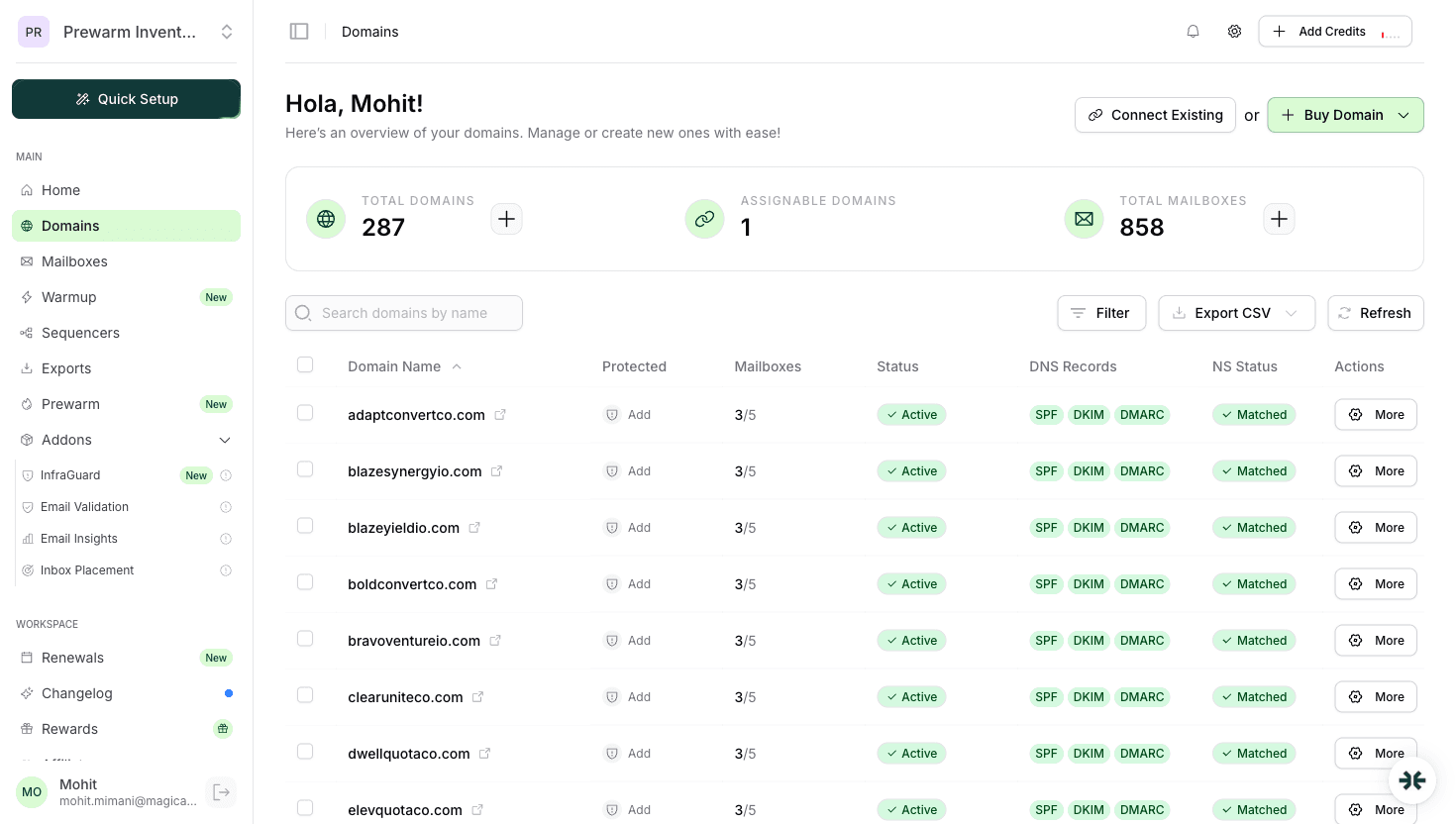
Screenshot reference: See the quick-setup.png screenshot in the InboxKit dashboard. the 5-step setup wizard walks you through domain purchase, DNS configuration, mailbox creation, warmup activation, and sequencer connection in a single guided flow.
How many domains? Rule of thumb: 1 domain per 50 emails/day. Sending 500 emails/day? Buy 10 domains.
Domain naming: Use variations of your brand or related industry terms. Avoid exact copies of your primary domain.
Domain extensions: .com is safest. .io, .co, .net are acceptable. Avoid obscure TLDs.
Where to buy: InboxKit includes domain registration starting at $2/year with automatic DNS configuration. Or buy elsewhere and point nameservers to InboxKit.
Domain age: New domains need 2-4 weeks of warmup. Aged domains can ramp faster.
SPF (Sender Policy Framework): Tells receiving servers which IPs can send on behalf of your domain. Must be configured correctly or emails fail authentication.
DKIM (DomainKeys Identified Mail): Cryptographic signature proving emails were not altered in transit. Each mailbox provider has specific DKIM records.
DMARC (Domain-based Message Authentication): Policy telling receivers what to do with emails that fail SPF/DKIM. Start with p=none, move to p=quarantine after warmup.
MX Records: Points your domain to the correct mail server.
InboxKit automates all DNS configuration. When you create a mailbox, SPF, DKIM, DMARC, and MX records are set up automatically within minutes.
Here is the complete decision matrix for mailbox provisioning:
| Factor | Google Workspace | Microsoft 365 |
|---|---|---|
| InboxKit price | $2.50/mo (annual) | $2.50/mo |
| Warmup time | 14-16 days (faster) | 17-21 days |
| Gmail inbox rate | 85-92% (higher) | 78-85% |
| Outlook inbox rate | 75-82% | 82-90% (higher) |
| Best for | Gmail-heavy B2B audiences | Provider diversity + Outlook audiences |
| Recommended split | 70% of your mailboxes | 30% of your mailboxes |
Mailboxes per domain: 2-3 is the safe maximum. More than 5 per domain increases domain-level reputation risk.
Mailbox naming rules: | Do This | Do Not Do This | |---------|---------------| | john.smith@ | sales@ | | sarah@ | info@ | | mike.johnson@ | noreply@ | | j.williams@ | contact@ |
InboxKit provisioning: Bulk creation supports 30+ mailboxes in a single batch with automatic DNS configuration for each domain.
Why warmup? New mailboxes have zero reputation. Sending cold emails immediately will land in spam. Warmup builds reputation through controlled sending and receiving.
Duration: 14-21 days minimum. Do not skip or shorten.
Volume ramp: Start at 5-10 emails/day, increase by 2-3 per day. Target 30-40/day for cold outreach.
Isolated vs shared warmup: Isolated (InboxKit) produces 92% inbox placement. Shared pool produces 80-85%. The difference compounds at scale.
InboxKit warmup: Activate from the dashboard. The isolated network handles everything automatically.
Manual monitoring takes 4-5 hours/week for 50+ mailboxes.
InfraGuard (InboxKit) automates all monitoring: continuous DNS checks, blacklist scanning, reputation tracking, anomaly detection, and auto-pause when issues are found. Replaces manual monitoring entirely.
Connect your warmed-up mailboxes to your cold email sending tool:
InboxKit supports one-click export to: Instantly, SmartLead, Salesforge, Woodpecker, Reply.io, Snov.io, Lemlist, Saleshandy, Emailbison, ReachInbox, SendKit, Manyreach, Supersend, BrandJet, and 10+ more (24+ total integrations).
Connection methods: IMAP/SMTP credentials or OAuth (Google/Microsoft). OAuth is preferred for security and reliability.
Sending limits: Start at 20-30 emails/day per mailbox. Increase gradually to 40-50 max.
Here is the complete setup mistake checklist with the fix for each:
| # | Mistake | Impact | Fix | InboxKit Auto-Fix? |
|---|---|---|---|---|
| 1 | Skipping warmup | 54% vs 88% inbox placement | Complete 14-21 day warmup before any cold outreach | Automated warmup at $3/mailbox/mo |
| 2 | Wrong DNS records | SPF/DKIM/DMARC failures = emails land in spam | Verify all three pass via Gmail Show Original | Yes. auto-configured |
| 3 | Too many mailboxes per domain | Domain reputation risk if one mailbox gets flagged | Stay at 2-3 mailboxes per domain maximum | Yes. enforced during provisioning |
| 4 | Sending too fast | Triggers spam filters and ISP rate limiting | Start at 20-30/day per mailbox, increase gradually | Warmup handles ramp-up |
| 5 | No monitoring | Blacklists and DNS issues compound silently for days | Check blacklists daily, DNS weekly, reputation weekly | Yes. InfraGuard continuous monitoring |
| 6 | Same content across all mailboxes | Pattern detection by email providers | Rotate subject lines, body copy, and CTAs across mailboxes | Manual (copy strategy) |
| 7 | Ignoring bounce rates | Bounces above 5% trigger spam filters | Clean and verify email lists before every campaign | InfraGuard alerts on bounce spikes |
Screenshot reference: See the quick-setup.png screenshot. InboxKit's guided wizard prevents mistakes 2, 3, and 5 by automating DNS, enforcing domain limits, and enabling InfraGuard during initial setup.
With InboxKit: 15 minutes for initial setup, 14-21 days for warmup. Total time to campaign-ready: 2-3 weeks.
On InboxKit: Agency plan $99/mo (30 included) + additional at $3.25 each, domains from $2/year. A 50-mailbox setup costs $164/month (Agency + 20 extra), plus $150/month for warmup ($3/mailbox/mo add-on).
Not required but recommended. Provider diversity reduces risk. A 70/30 Google/Microsoft split is common.
Plans from $39/mo with 10 mailboxes included. Automated DNS, warmup, and InfraGuard monitoring included.



