
LearnGuides
The Complete Email Deliverability Guide (2026): Checklist, Benchmarks and Fixes

By Rahul LakhaneyPublished on: Mar 30, 2026 · Updated: Sep 6, 2026 · 28 min read · Last reviewed: Sep 2026
TL;DR
Everything you need to achieve 90%+ inbox placement rates in 2026. From authentication protocols to content optimization to real-time monitoring. this is the guide I wish existed when I started managing email infrastructure for agencies.
Email deliverability is not the same as email delivery. Delivery means the receiving server accepted your message. Deliverability means your message actually landed in the primary inbox, not the spam folder or promotions tab.
This distinction matters because most email platforms report delivery rates of 98-99%, which makes everything look fine. But when you check actual inbox placement, the picture changes. In our testing across 200+ client accounts, the average email inbox placement rate sits around 72%. meaning nearly 1 in 3 emails that get "delivered" never reach the primary inbox.
Here are the key factors that determine deliverability, ranked by impact:
| Factor | Impact | What It Controls | How to Optimize |
|---|---|---|---|
| Authentication (SPF/DKIM/DMARC) | Critical (51pt swing) | Server trust in your identity | Automated via InboxKit |
| Sender Reputation | Critical | ISP scoring of your domain/IP | Consistent sending + monitoring |
| IP Location | High (12-18pt swing) | Baseline trust level | US-based IPs (InboxKit default) |
| Warmup Quality | High (34pt swing) | Initial reputation baseline | Isolated warmup ($3/mailbox/mo) |
| Content Quality | Medium-High | Spam filter classification | Plain text, personalization |
| Engagement Signals | Medium-High | Ongoing reputation | Good targeting + copy |
| Volume Consistency | Medium | Spam filter triggers | Gradual scaling |
| List Hygiene | Medium | Bounce rate / spam traps | Verify before sending |
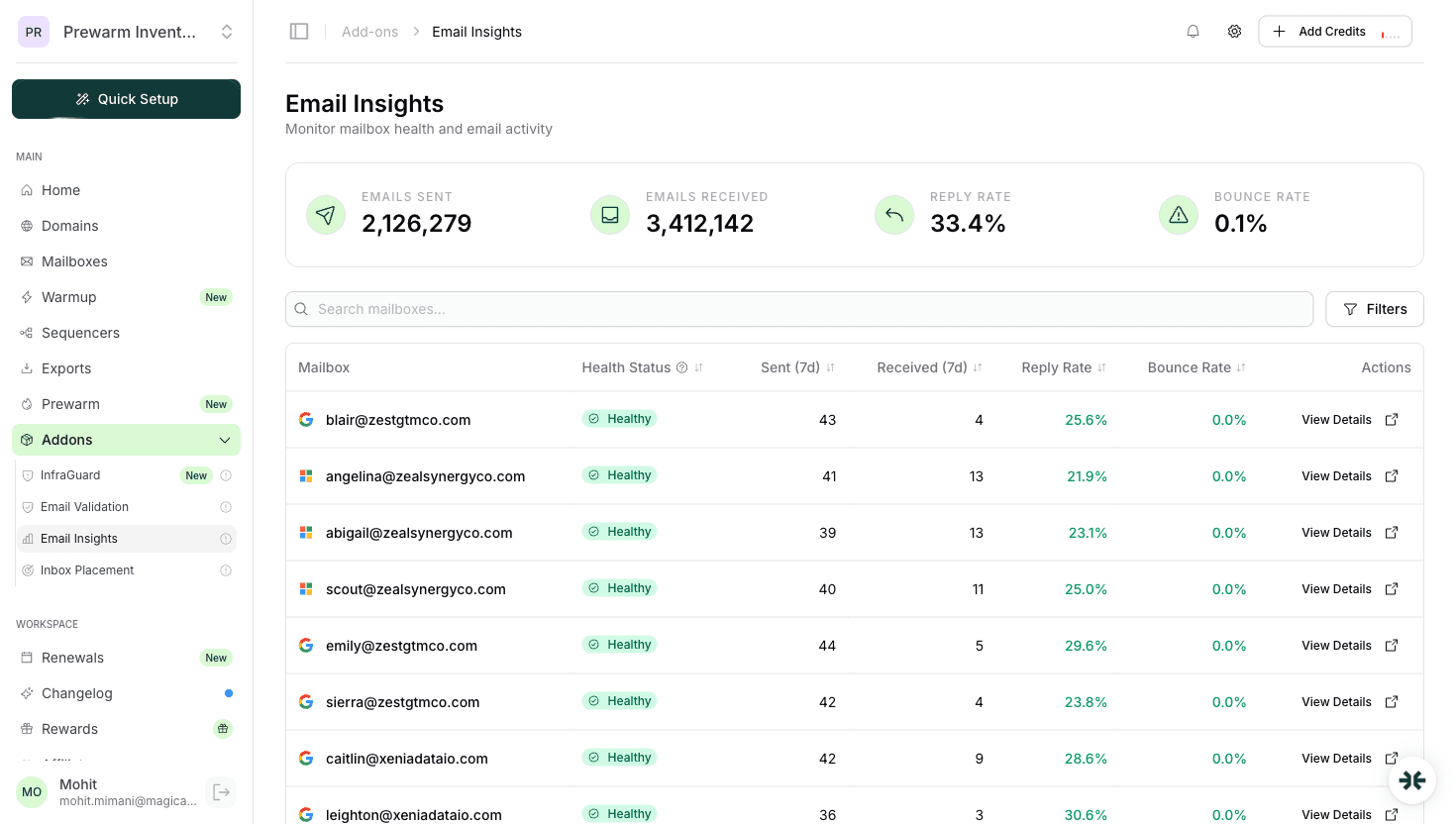
Data from InboxKit Email Insights across 200+ client accounts and thousands of mailboxes.
Deliverability is determined by a combination of factors: your sending infrastructure, authentication records, sender reputation, content quality, and recipient engagement. No single factor is a silver bullet. You need all of them working together.
The good news is that deliverability is entirely within your control. Unlike open rates or reply rates that depend on your copy and targeting, deliverability is an infrastructure problem with infrastructure solutions. Set it up correctly once, monitor it consistently, and you will outperform 90% of senders who treat it as an afterthought.
At InboxKit, we have managed deliverability across thousands of mailboxes at $2.50/mo per Google Workspace account. The patterns in this guide come from that operational experience, not theory.
Work this list top to bottom before a new domain sends its first cold email, and again whenever placement drops. Each line has a pass condition you can verify in under a minute.
| # | Check | Pass condition | Verify with |
|---|---|---|---|
| 1 | SPF record | One record, every sending service included, under 10 DNS lookups | SPF checker |
| 2 | DKIM signing | Selector resolves, 2048-bit key, signature passes on a test message | DKIM checker |
| 3 | DMARC policy | Published, aligned with the From domain, at least p=none with a reporting address | DMARC checker |
| 4 | Core DNS | MX, A and reverse DNS resolve, no stray or duplicate records | DNS checker |
| 5 | Blacklists | Domain and sending IP absent from every major DNSBL | Blacklist checker |
| 6 | Warmup | 14 days completed before cold volume starts | Email warmup guide |
| 7 | Volume | 30 or fewer emails per mailbox per day, growth under 30% a week | Mailbox calculator |
| 8 | List quality | Addresses verified, hard bounce rate under 2% | Your verification tool's report |
| 9 | Complaints | Spam complaint rate under 0.1% (Google's hard ceiling is 0.3%) | Google Postmaster Tools |
| 10 | Content | Plain text, one link, no trigger phrases, passes a spam score check | Email spam checker |
| 11 | Opt-out | A visible way to stop receiving email, honoured within 48 hours | Manual review of the template |
| 12 | Placement | 90%+ inbox placement on a seed test before launch, weekly after | Inbox placement testing |
Points 1 to 5 are infrastructure and fail silently: nothing in your sequencer tells you a DKIM key rotated or a domain landed on a blocklist. InboxKit's InfraGuard re-runs those five checks every six hours on every domain it manages. Points 6 to 12 are behaviour, and no tool can do them for you.
Two different numbers get called "deliverability rate", and only one of them matters.
| Metric | What it measures | Healthy | Investigate |
|---|---|---|---|
| Delivery rate | Messages the receiving server accepted (no bounce) | 97%+ | Under 95% |
| Inbox placement rate | Messages that reached the primary inbox, not spam or promotions | 90%+ | Under 80% |
| Hard bounce rate | Invalid or dead addresses | Under 2% | Over 3% |
| Spam complaint rate | Recipients who clicked "report spam" | Under 0.1% | Any reading above 0.3% |
Your sequencer reports delivery rate, which is why almost everyone believes their deliverability is fine. Delivery rate stays at 98% while half your mail sits in spam, because the server did accept it. Inbox placement is the number to manage, and the only way to read it is a seed-list placement test, covered later in this guide.
For cold outreach specifically, 90% inbox placement is the target after warmup. Between 80% and 90%, pause growth and find the weak provider. Below 80%, stop sending from that mailbox and work the checklist above from the top.
Authentication is the foundation of deliverability. Without it, your emails are essentially unsigned letters. any receiving server has reason to distrust them.
SPF (Sender Policy Framework) tells receiving servers which IP addresses are authorized to send email for your domain. You publish a TXT record in your DNS that lists approved senders. When Gmail or Outlook receives an email from your domain, it checks the sending IP against your SPF record. If the IP is not listed, the email fails SPF.
A typical SPF record looks like: v=spf1 include:_spf.google.com ~all. The include directive authorizes Google's mail servers. The ~all means softfail for anything else, which is the recommended starting point. Avoid using +all (which authorizes everyone) or stacking too many includes. SPF has a 10 DNS lookup limit, and exceeding it causes the entire record to fail.
DKIM (DomainKeys Identified Mail) adds a cryptographic signature to every email you send. The receiving server uses a public key published in your DNS to verify that the message was not modified in transit. DKIM does not prevent anyone from sending email as your domain. it just proves that legitimate emails from you are authentic.
DMARC (Domain-based Message Authentication, Reporting, and Conformance) ties SPF and DKIM together. It tells receiving servers what to do when an email fails authentication checks. DMARC policies range from p=none (monitor only) to p=quarantine (send to spam) to p=reject (block entirely).
The correct setup order is: SPF first, DKIM second, DMARC at p=none third. Monitor DMARC reports for 2-4 weeks, fix any issues, then move to p=quarantine and eventually p=reject. InboxKit configures all three automatically when you create a mailbox, which eliminates the most common authentication mistakes.
Check all three in one pass with the DNS checker, or one at a time with the SPF checker, DKIM checker and DMARC checker. For how the three protocols fit together, read SPF, DKIM and DMARC explained.
Every email you send contributes to your sender reputation. a score that ISPs maintain for your domain and IP address. Think of it as a credit score for email. Good behavior builds it up; bad behavior tears it down fast.
Domain reputation follows your domain across any IP you send from. If you burn a domain by sending spam, switching to a new IP will not help. Google's Postmaster Tools is the best free way to monitor domain reputation. it shows a rating from Bad to High.
IP reputation is tied to the specific IP address your emails originate from. Shared IPs (like those on most email platforms) mean your reputation is partially determined by other senders. Dedicated IPs give you full control but require proper warming. InboxKit uses US-based IPs for all Google Workspace accounts, which provides a higher baseline reputation with North American ISPs.
The factors that influence reputation most heavily, ranked by impact:
Reputation is easier to maintain than to rebuild. A domain that drops to "Bad" reputation on Google Postmaster Tools can take 4-8 weeks of perfect sending to recover. Prevention through monitoring is always the better strategy.
Domain and IP reputation recover on different timelines; domain reputation vs IP reputation covers which one to fix first. If reputation collapses overnight rather than drifting, check for a listing with the blacklist checker before you change anything else.
New mailboxes and new domains have no sending history, so ISPs treat them with suspicion. Warmup is the process of increasing volume gradually while generating real engagement, so that Gmail and Microsoft can observe your behaviour and assign a positive reputation before cold volume starts.
Here is the schedule we run for every InboxKit mailbox, per mailbox:
Critical rules during warmup:
The full day-by-day table with target open and reply rates, the provider differences, and the mistakes that reset a warmup are in the email warmup guide. InboxKit's isolated warmup runs the schedule automatically using real conversations between InboxKit accounts, so the engagement signals are genuine rather than a shared pool that may include spammers.
For agencies managing many mailboxes, the math is straightforward: 50 mailboxes at $2.50/mo ($149.50/mo total) with automated warmup saves roughly 15 hours of manual setup time per batch.
Your email content directly affects whether ISPs classify your message as legitimate or spam. Content filters have evolved far beyond simple keyword matching. they now analyze linguistic patterns, formatting, and behavioral signals.
Text-to-HTML ratio: Keep emails mostly plain text, especially for cold outreach. Heavy HTML, multiple images, and complex formatting increase spam scores. An email should look like a message one human would send to another. because that is exactly what it should be.
Subject lines: Avoid ALL CAPS, excessive punctuation (!!!), and spam trigger phrases like "Act now," "Limited time," or "Free." The best email subject lines are short (4-7 words), lowercase, and sound like a normal email between colleagues. Example: "quick question about [company]" outperforms "Exclusive Offer for [Company] - Don't Miss Out!!!" every time.
Links and tracking: Limit to one link maximum in emails. Every tracked link runs through a redirect domain, and ISPs know this. Multiple tracked links in a short email is a strong spam signal. If you must track, use a custom tracking domain rather than your sequencer's default.
Personalization: Genuine personalization (referencing the recipient's company, recent news, specific pain points) improves deliverability because it increases engagement. Template merge tags like {{first_name}} are table stakes. real personalization goes deeper.
Signatures: Include a plain text signature with your name, title, and company. Avoid image-heavy signatures with banners, social icons, and legal disclaimers. Keep it clean and professional.
Unsubscribe handling: For email, include a one-click unsubscribe option. Google and Yahoo require this for bulk senders as of 2024, and it actually helps deliverability because it gives recipients an alternative to hitting the spam button.
One pattern I see consistently: senders who write short, personalized, plain-text emails with one clear CTA get 2-3x better inbox placement than those sending HTML templates with images and multiple links. The infrastructure matters, but so does the content.
Run the draft through the email spam checker before it goes into a sequence. It scores trigger phrases, capitalisation, link patterns and HTML weight against the same signals filters use, and it lists the exact line that caused each flag.
You cannot improve what you do not measure. Inbox placement testing is the only way to know exactly where your emails land across different providers.
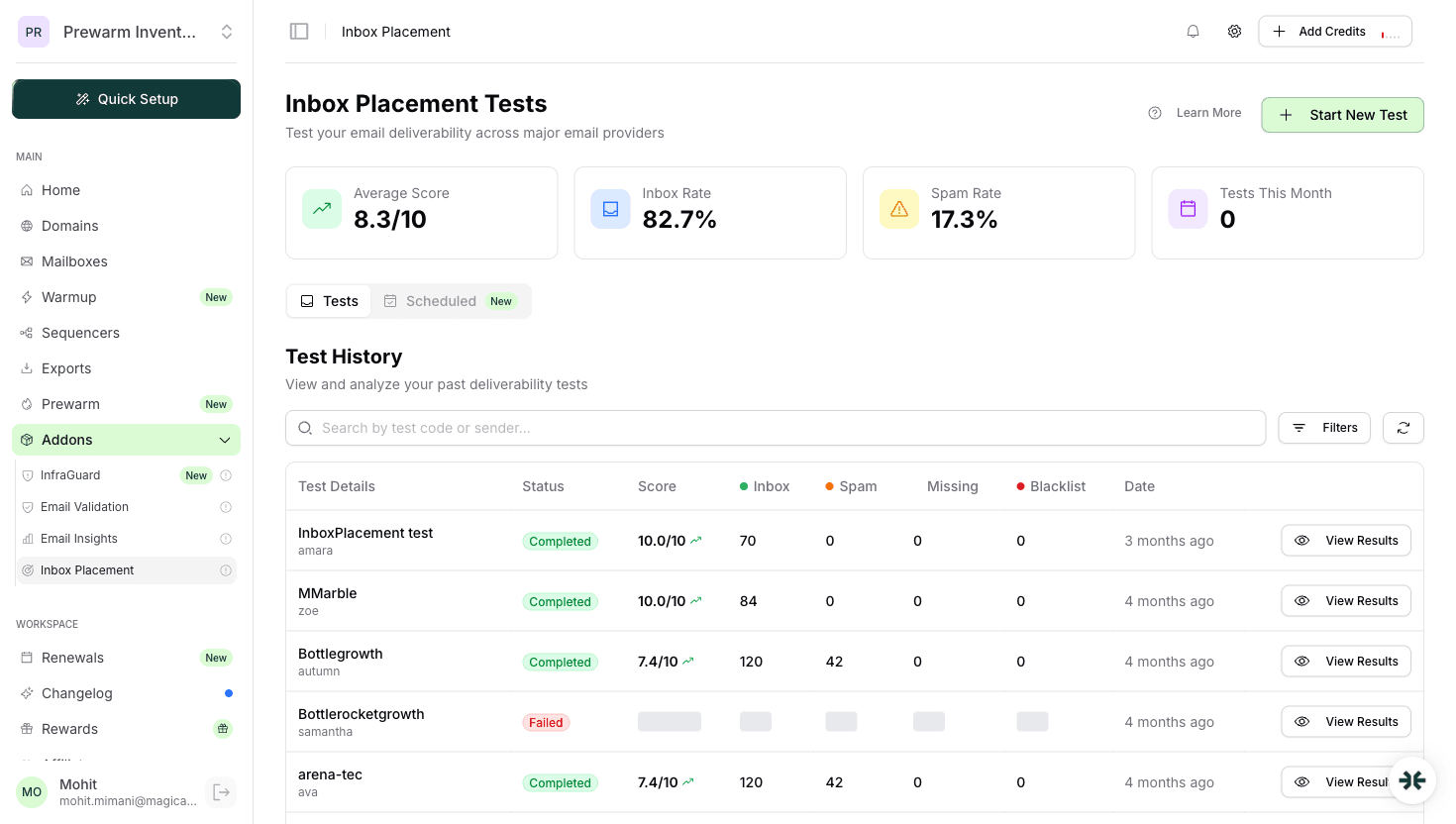
Here is how it works: you send a test email to a set of seed addresses across Gmail, Outlook, Yahoo, and other providers. Then you check each seed inbox to see whether the email arrived in the primary inbox, promotions tab, spam folder, or was blocked entirely.
Interpreting results: A healthy email account should show 90%+ inbox placement across providers. If Gmail placement drops below 80%, check Google Postmaster Tools for reputation issues. If Outlook placement drops, verify your SPF record and check Microsoft SNDS (Smart Network Data Services).
InboxKit includes inbox placement testing in the platform. You can run tests directly from the dashboard and see results broken down by provider. We find that most deliverability problems are caught earliest by placement tests. often 3-5 days before they show up as declining reply rates.
The seed list trap: Be aware that seed-based testing has limitations. Seed accounts do not interact with your emails the way real recipients do, so placement results are a leading indicator rather than a perfect prediction. Combine placement testing with real campaign metrics for the full picture.
For agencies running multiple client accounts, we recommend testing at least 2-3 mailboxes per client weekly. At $2.50/mo per mailbox with testing included, this is a negligible cost compared to the revenue lost from undetected spam folder placement.
Deliverability is not a set-it-and-forget-it operation. Conditions change: ISPs update algorithms, blacklists add entries, DNS records get accidentally modified, and sending patterns drift. Continuous monitoring is what separates teams that maintain 90%+ inbox rates from those who discover problems after their pipeline has dried up.
What to monitor:
InfraGuard, InboxKit's monitoring system, automates all of this. It runs continuous checks against blacklists, validates DNS records, monitors reputation scores, and tracks sending patterns. When it detects an anomaly. say a mailbox hits a blacklist or DNS records become invalid. it can automatically pause sending and alert you.
The value of automated monitoring scales with the number of mailboxes you manage. Manually checking 10 mailboxes takes 30 minutes. Checking 100 takes the entire morning. InfraGuard checks all of them every few hours without any manual effort.
Monitoring is insurance. You invest a small amount of time and money to prevent catastrophic deliverability failures that could cost thousands in lost deals.
After managing thousands of mailboxes, these are the issues I see most often and how to resolve them:
Issue 1: Emails going to spam on Gmail
Why emails go to spam lists every cause; here it is usually one of: DMARC set to p=none (not enforced), low engagement on recent sends, or content triggering spam filters. Fix: verify DMARC is at p=quarantine or p=reject, improve targeting to boost engagement, simplify email content.
Issue 2: High bounce rates on new domains New domains without sending history get more aggressive bouncing from some providers. This is normal during warmup. Fix: slow down the warmup schedule, verify all recipient addresses before sending, start with providers that are more lenient (Google tends to be more forgiving than Microsoft for new senders).
Issue 3: Deliverability drops after scaling volume Increasing daily send volume too quickly. even on a warmed account. triggers spam filters. Fix: never increase volume by more than 20-30% per week. If you need to scale faster, add more mailboxes rather than sending more from each one, and stay well inside the Google and Microsoft sending limits. InboxKit's pricing at $2.50/mo per mailbox makes horizontal scaling affordable.
Issue 4: Domain blacklisted on Spamhaus or Barracuda Usually caused by spam complaints, hitting spam traps, or association with a bad IP range. Fix: identify the root cause (check what changed in your sending), request removal through the blacklist's process (the blacklist removal guide has the form for each list), wait 24-72 hours, test before resuming.
Issue 5: Inconsistent deliverability across providers Gmail placement is fine but Outlook is terrible, or vice versa. Each provider uses different algorithms. Fix: check provider-specific tools (Google Postmaster, Microsoft SNDS), adjust your authentication and content for the problem provider, consider using different mailbox providers (Google Workspace for Gmail-heavy prospects, Microsoft 365 for Outlook; see Google Workspace vs Microsoft 365).
Issue 6: Warmup completed but deliverability is still poor Warmup builds baseline reputation, but ongoing sending behavior determines long-term deliverability. Fix: review your sending patterns, check list quality, audit email content, and ensure engagement stays above 15-20% open rates. If the underlying problem is content or targeting, no amount of infrastructure will save you.
For every issue above, the first step is always the same: check your authentication records, review your sending data, and test inbox placement. Start with facts, not assumptions.
A good deliverability rate for cold email is 90% or better inbox placement, measured with a seed-list placement test. Delivery rate (accepted by the server) should be 97% or better, but it is not the number that matters. If inbox placement drops below 80%, stop sending from that mailbox and work through authentication, reputation and content in that order.
It depends on the severity. DNS and authentication fixes take effect within 1-4 hours. Blacklist removal takes 24-72 hours. Reputation recovery takes 2-8 weeks of consistent, clean sending. The faster you detect the problem, the faster you can fix it.
Yes. InboxKit automates DNS authentication setup, offers isolated warmup ($3/mailbox/mo add-on), includes InfraGuard monitoring for blacklists and reputation, and offers inbox placement testing. Plans start at $39/mo for 10 mailboxes.
Use both for provider diversity. Google Workspace tends to have better deliverability to Gmail recipients, and Microsoft 365 performs better with Outlook. InboxKit plans support Google Workspace, Microsoft 365, and Azure (plans from $2.50/mailbox/mo), so running a mix is affordable.
After warmup, the safe range is 15-30 emails per mailbox per day for cold outreach. Going above 50/day per mailbox significantly increases spam risk. Scale by adding more mailboxes, not by pushing volume on existing ones.
Delivery means the receiving server accepted the message, so it did not bounce. Deliverability means the message reached the primary inbox rather than spam or promotions. Sequencers report delivery, which is why a 98% delivery rate can hide a 50% spam rate. Only a placement test shows deliverability.
Run the 12-point checklist in this guide: validate SPF, DKIM, DMARC and core DNS with the free checkers, confirm the domain and IP are not blacklisted, run your copy through a spam checker, then send a seed-list placement test to Gmail, Outlook and Yahoo addresses. Repeat the placement test weekly on active mailboxes and immediately after any DNS or domain change.
Free tools and pages that go with this guide.
 Guides
 Rahul LakhaneyGuides
 Saksham JainGuidesSaksham JainGuidesRahul Lakhaney
From $2.50/mailbox/mo. No plans or slots. Automated DNS, warmup, and InfraGuard monitoring included.