
LearnGuides
Connect InboxKit to Instantly, SmartLead, and 22 More Sequencers

By Saksham JainPublished on: Mar 31, 2026 · Updated: Apr 12, 2026 · 7 min read · Last reviewed: Apr 2026
TL;DR
InboxKit works with 24+ sequencer platforms. Here is how to connect your mailboxes to each one, with exact steps, connection methods, and troubleshooting tips.
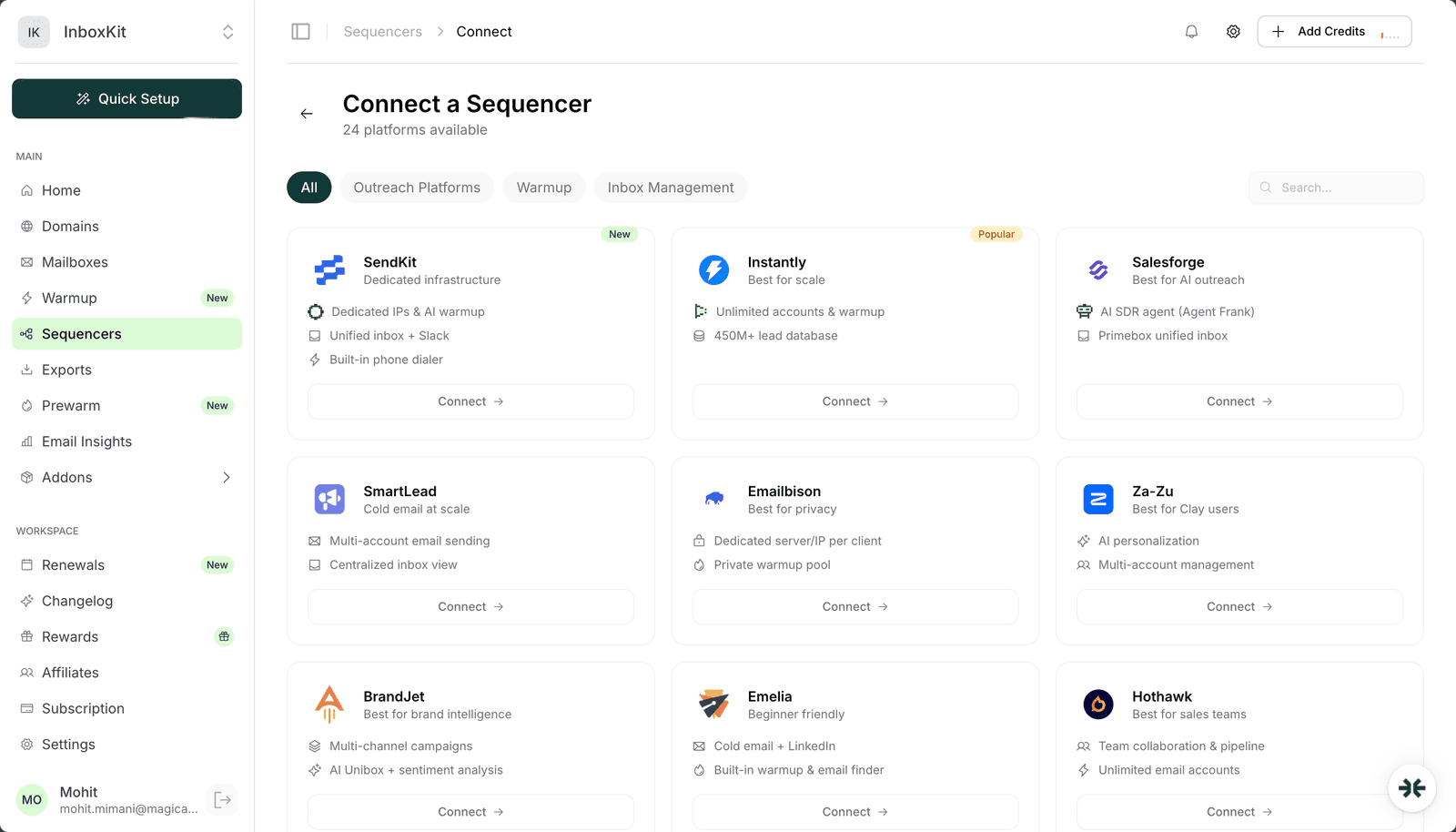
InboxKit integrates with 24 cold email, warmup, and inbox management platforms. Here is the full list grouped by category.
Outreach Platforms (18):
| Sequencer | Connection Method | Auto-Export? |
|---|---|---|
| Instantly | Login credentials + optional API key | Yes (with SendKit) |
| SendKit | Login credentials | Yes (native) |
| SmartLead | Login credentials | No |
| Salesforge | Login credentials | No |
| Saleshandy | Login credentials | No |
| Reply.io | Login credentials | No |
| Snov.io | Login credentials | No |
| Lemlist | Login credentials | No |
| Woodpecker | Login credentials | No |
| EmailBison | Login credentials | No |
| ReachInbox | Login credentials | No |
| Emelia | Login credentials | No |
| PlusVibe | Login credentials | No |
| BrandJet | API key | No |
| LeadsPicker | Login credentials | No |
| Manyreach | Login credentials | No |
| Supersend | API key | No |
| Za-Zu | Login credentials | No |
Warmup Tools (4):
| Sequencer | Connection Method | Auto-Export? |
|---|---|---|
| TrulyInbox | Login credentials | No |
| Warmforge | Login credentials | No |
| MailToaster | Login credentials | No |
| Warmy.io | Login credentials | No |
Inbox Management (2):
| Sequencer | Connection Method | Auto-Export? |
|---|---|---|
| Hothawk | Login credentials | No |
| Master Inbox | Login credentials | No |
Auto-export with SendKit: If you use SendKit (see our full SendKit review), InboxKit supports automatic export. New mailboxes push to your SendKit account without manual intervention.
Source: InboxKit Sequencers page (docs.inboxkit.com) and each platform's integration documentation.
Instantly is the most popular sequencer among InboxKit users. Here is the exact process:
| Step | Action | Time |
|---|---|---|
| 1 | Go to InboxKit Sequencers page | 10 sec |
| 2 | Click 'Add Sequencer' and select Instantly | 10 sec |
| 3 | Enter your Instantly API key (from Instantly Settings > Integrations) | 30 sec |
| 4 | Configure CNAME record (InboxKit provides the value) | 1 min |
| 5 | Select mailboxes to export | 30 sec |
| 6 | Click Export. mailboxes appear in Instantly within minutes | 30 sec |
Total time: ~3 minutes.
CNAME configuration: Instantly requires a CNAME record to verify domain ownership. InboxKit provides the exact CNAME value in the sequencer setup flow. The record typically propagates within 15-30 minutes.
Auto-export with SendKit: If you use SendKit as your sequencer, InboxKit supports automatic export. new mailboxes are pushed to your SendKit account without manual intervention (see screenshot showing 'Auto Export' badge).
Source: InboxKit Sequencers page (see screenshot), Instantly integration documentation.
For sequencers that don't support API integration, use SMTP/IMAP credentials. This works with ANY email platform.
Google Workspace SMTP/IMAP settings:
| Setting | Value | Source |
|---|---|---|
| SMTP Server | smtp.gmail.com | support.google.com/a/answer/176600 |
| SMTP Port | 587 (TLS) or 465 (SSL) | Google Workspace Admin Help |
| IMAP Server | imap.gmail.com | support.google.com/a/answer/9003945 |
| IMAP Port | 993 (SSL) | Google Workspace Admin Help |
| Username | Full email address | - |
| Password | App-specific password | support.google.com/accounts/answer/185833 |
Microsoft 365 SMTP/IMAP settings:
| Setting | Value | Source |
|---|---|---|
| SMTP Server | smtp.office365.com | learn.microsoft.com |
| SMTP Port | 587 (TLS) | Microsoft documentation |
| IMAP Server | outlook.office365.com | learn.microsoft.com |
| IMAP Port | 993 (SSL) | Microsoft documentation |
| Username | Full email address | - |
| Password | Account password or app password | - |
Important: Google Workspace requires app-specific passwords (not your regular password) for SMTP/IMAP connections. Generate one at myaccount.google.com/apppasswords.
Source: Google Workspace SMTP settings (support.google.com/a/answer/176600), Microsoft 365 SMTP settings (learn.microsoft.com).
At scale, you need to export hundreds of mailboxes efficiently.
InboxKit export capabilities:
| Feature | Details | Source |
|---|---|---|
| Bulk export | Export all mailboxes to a sequencer in one click | InboxKit Exports page |
| CSV export | Download mailbox credentials as CSV | InboxKit Mailboxes page |
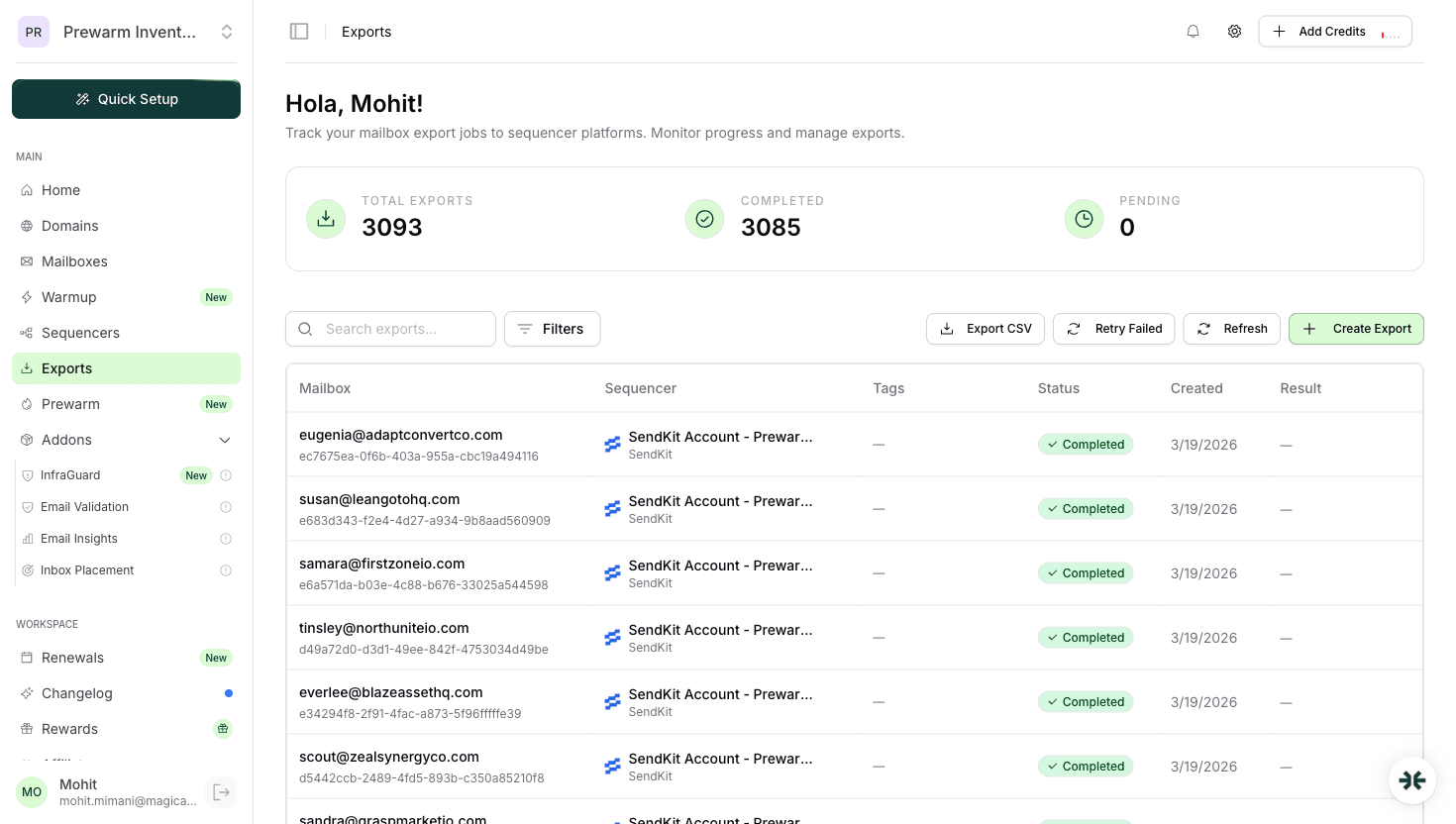
| Export history | Track all 3,093+ exports with status | InboxKit Exports page (see screenshot) |
| Failed export retry | One-click retry for failed exports | InboxKit Exports page |
| Auto-export (SendKit) | Automatic push on new mailbox creation | SendKit integration |
At 858 mailboxes and 3,093 exports, InboxKit handles large-scale export operations reliably. The average export completes within 2-5 minutes.
Source: InboxKit Exports page data (see screenshot).
The most common problems and their fixes:
| Issue | Cause | Fix | Frequency |
|---|---|---|---|
| CNAME not verifying | DNS propagation delay | Wait 30 min, check with DNS Checker | 30% of issues |
| SMTP authentication failed | Wrong password type | Use app-specific password (Google) | 25% of issues |
| IMAP connection timeout | Port blocked | Use port 993 with SSL, check firewall | 15% of issues |
| Export stuck at 'Pending' | Sequencer API rate limit | Wait 5 min, retry | 15% of issues |
| Mailboxes not appearing | Sequencer cache | Refresh sequencer mailbox list | 10% of issues |
| Duplicate mailbox error | Already exported | Check sequencer for existing account | 5% of issues |
Instantly and SendKit have the deepest integrations (login credentials + auto-export). SmartLead and ReachInbox also support direct connections. All 24 platforms connect through login credentials or API key. InboxKit handles the mailbox export automatically.
Technically yes, but we do not recommend it. Each mailbox should be connected to one sequencer to prevent sending conflicts and maintain deliverability.
Login-based exports (Instantly, SmartLead, and most platforms): 2-5 minutes per batch. API key exports (BrandJet, Supersend): 2-3 minutes. Bulk CSV export: instant download.
No. InboxKit handles the differences automatically. Whether your mailboxes are Google Workspace or Microsoft 365, you connect your sequencer account once and InboxKit exports the correct credentials for each mailbox type.
Check the Exports page for error details. Most failures are CNAME propagation delays or API rate limits. Use the one-click retry button after fixing the issue.
Plans from $39/mo with 10 mailboxes included. Automated DNS, warmup, and InfraGuard monitoring included.

