
LearnGuides
How to Monitor Email Deliverability: Tools and Setup (2026)

By Rahul LakhaneyPublished on: Mar 31, 2026 · 8 min read · Last reviewed: Mar 2026
TL;DR
Flying blind on deliverability is the most expensive mistake in email. Here is how to set up monitoring with free tools (Google Postmaster, Microsoft SNDS) and InfraGuard for complete visibility.
Complete deliverability monitoring requires multiple tools because no single tool covers everything.
| Tool | What It Monitors | Cost | Coverage | Setup Time | Source |
|---|---|---|---|---|---|
| Google Postmaster Tools | Gmail-specific reputation, spam rate, auth | Free | Gmail only | 15 min | postmaster.google.com |
| Microsoft SNDS | Microsoft-specific reputation, spam traps | Free | Outlook/Hotmail only | 15 min | sendersupport.olc.protection.outlook.com |
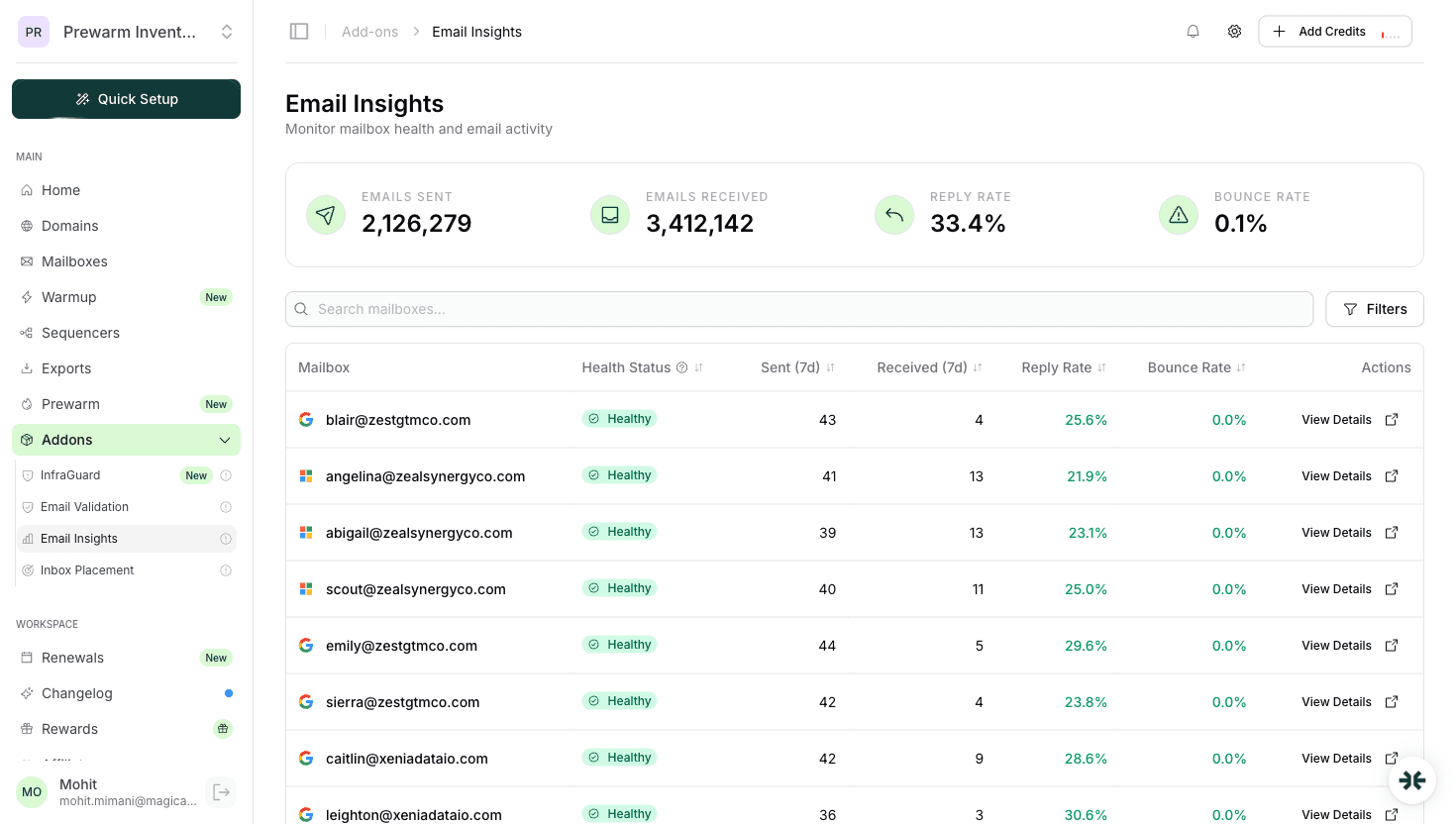
| InboxKit Email Insights | Per-mailbox health, reply/bounce rates | Included | All providers (via IMAP) | 0 (automatic) | app.inboxkit.com |
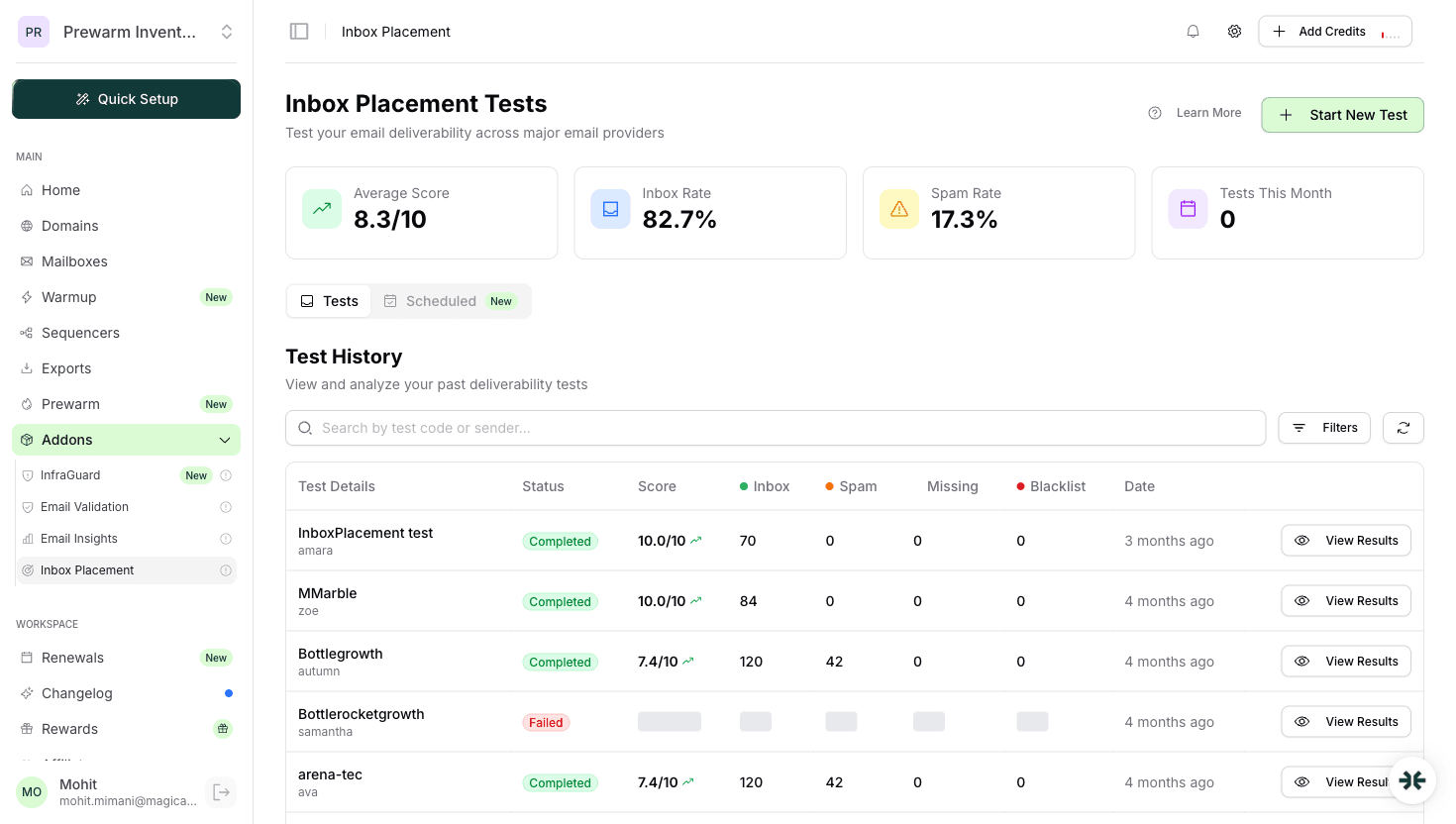
| InboxKit Inbox Placement | Actual inbox vs spam placement | Wallet-based per test | 70+ seed addresses | 5 min per test | app.inboxkit.com |
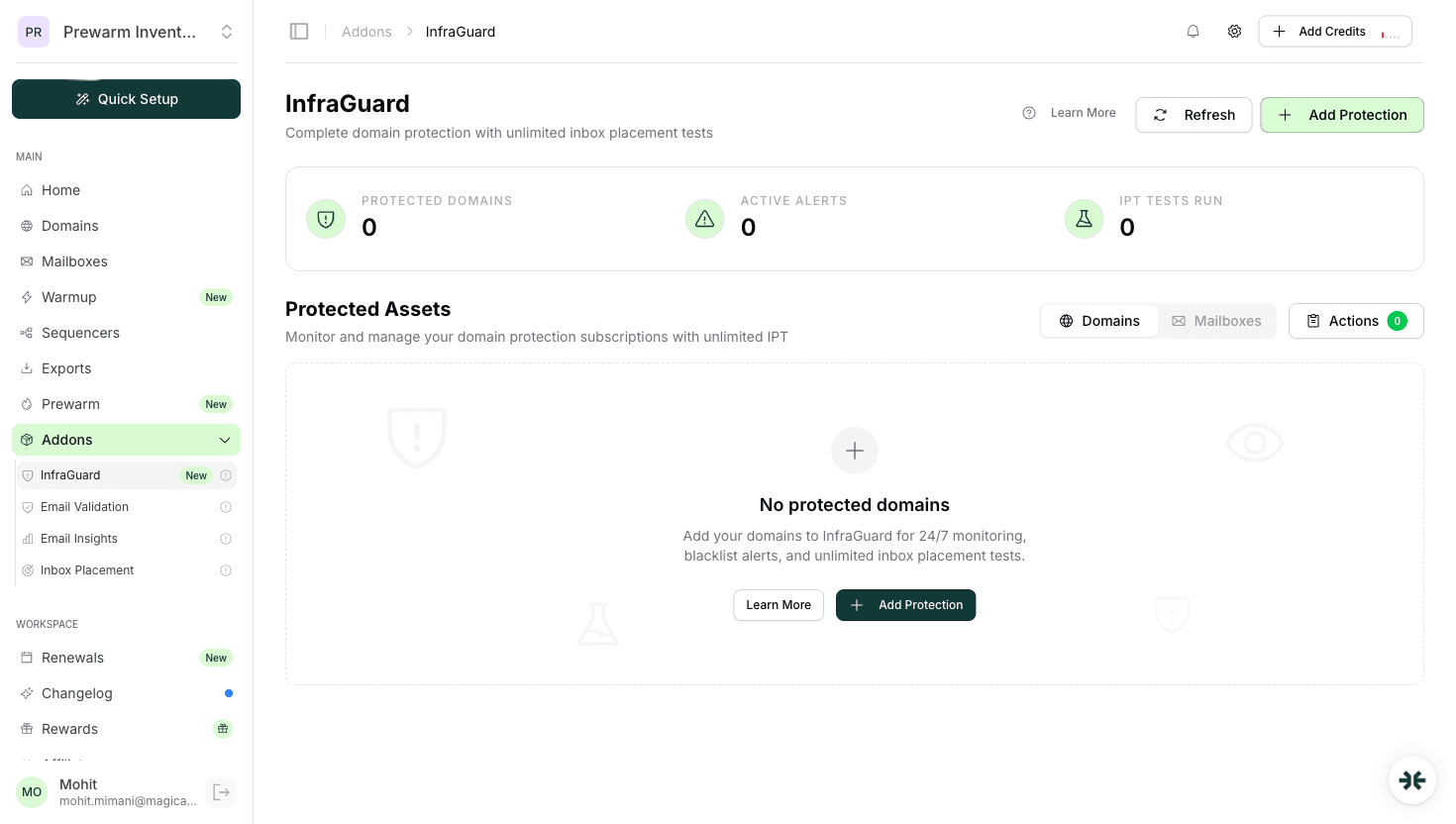
| InfraGuard | Blacklists, DNS health, continuous IPT | Per-domain subscription | 50+ blacklists + DNS | 2 min per domain | app.inboxkit.com |
| MXToolbox (free tier) | Basic blacklist + DNS check | Free (basic) | Manual checks only | 1 min per check | mxtoolbox.com |
Minimum viable monitoring: Google Postmaster + Microsoft SNDS + InboxKit Email Insights. These three cover Gmail reputation, Microsoft reputation, and per-mailbox health across all providers.
Recommended monitoring: Add InfraGuard for continuous blacklist monitoring and unlimited inbox placement tests. This catches problems hours before they affect campaign performance.
Source: Each tool's official documentation. InboxKit features from app.inboxkit.com.
Google Postmaster Tools is the single most important free monitoring tool for email.
Setup steps:
| Step | Action | Time | Notes |
|---|---|---|---|
| 1 | Go to postmaster.google.com | 1 min | Sign in with any Google account |
| 2 | Click 'Add Domain' | 30 sec | Enter your sending domain |
| 3 | Verify ownership via DNS TXT record | 5-10 min | Add the provided TXT record to your DNS |
| 4 | Wait for data (24-48 hours) | Wait | Need to send 100+ emails to Gmail first |
What you can monitor:
| Dashboard | What It Shows | Action Threshold | Source |
|---|---|---|---|
| Domain Reputation | High/Medium/Low/Bad rating | If Low or Bad: pause and investigate | Google Postmaster docs |
| Spam Rate | % of emails marked as spam by recipients | >0.1%: warning. >0.3%: critical | Google sender guidelines |
| IP Reputation | Reputation of sending IPs | Less relevant for Google Workspace users | Google Postmaster docs |
| Authentication | SPF/DKIM/DMARC pass rates | Should be 100%. Any failures need fixing | Google Postmaster docs |
| Encryption | TLS usage rate | Should be 100% | Google Postmaster docs |
| Delivery Errors | Bounce/rejection reasons | Any increase needs investigation | Google Postmaster docs |
Limitation: Google Postmaster only shows data after you have sent enough volume to Gmail addresses (typically 100+ emails). Small-scale senders may not see data.
Source: Google Postmaster Tools documentation (support.google.com/mail/answer/9981691).
Microsoft Smart Network Data Services monitors your reputation for Outlook, Hotmail, and Live.com recipients.
Setup steps:
| Step | Action | Time |
|---|---|---|
| 1 | Go to sendersupport.olc.protection.outlook.com | 1 min |
| 2 | Sign in with Microsoft account | 1 min |
| 3 | Request access for your sending IPs | 2 min |
| 4 | Verify IP ownership (automated) | 5-15 min |
What SNDS monitors:
| Metric | Green (Good) | Yellow (Warning) | Red (Bad) |
|---|---|---|---|
| Spam rate | <0.1% | 0.1-0.5% | >0.5% |
| Trap hits | 0 | 1-5 per day | >5 per day |
| Complaint feedback | <0.05% | 0.05-0.1% | >0.1% |
Limitation: SNDS works at the IP level, not domain level. For Google Workspace and Microsoft 365 users, you are on shared IPs, so SNDS data may not be individually actionable. Domain reputation (via Google Postmaster) is more useful for email.
Source: Microsoft SNDS documentation (sendersupport.olc.protection.outlook.com/snds/FAQ.aspx).
InboxKit provides three layers of monitoring, each solving different problems:
Layer 1: Email Insights (included with all mailboxes)
| Metric | What It Tracks | Alert Threshold | Screenshot |
|---|---|---|---|
| Emails Sent (7d) | Volume per mailbox per week | Sudden drops = possible suspension | email-insights.png |
| Emails Received (7d) | Incoming volume | Low = possible deliverability issue | email-insights.png |
| Reply Rate | Percentage of sends getting replies | <5% for warmed mailbox = investigate | email-insights.png |
| Bounce Rate | Hard + soft bounces | >2% = clean lists immediately | email-insights.png |
| Health Status | Composite health score | Anything below Healthy = action needed | email-insights.png |
Layer 2: Inbox Placement Tests (wallet-based)
| Feature | Details |
|---|---|
| Seed addresses | 70+ across Gmail, Microsoft, Yahoo, Apple Mail, corporate |
| Score | 0-10 scale (8.3 average across InboxKit accounts) |
| Breakdown | Per-provider inbox vs spam vs missing |
| Cost | Wallet-based, per test |
| Frequency | Run before campaigns, weekly for active domains |
Layer 3: InfraGuard (per-domain subscription)
| Feature | Details |
|---|---|
| Blacklist monitoring | 50+ blacklists checked continuously |
| DNS health | Monitors SPF/DKIM/DMARC for configuration drift |
| Unlimited IPT | Run inbox placement tests anytime at no extra cost |
| Alerts | Email/dashboard notifications on issues |
Source: InboxKit app (see screenshots above). All three features visible in the dashboard.
A practical monitoring schedule for email teams:
| Frequency | What to Check | Tool | Time Required |
|---|---|---|---|
| Daily | Email Insights health status | InboxKit dashboard | 2 min |
| Daily | Bounce rate per mailbox | Email Insights | 2 min |
| Weekly | Google Postmaster reputation | postmaster.google.com | 5 min |
| Weekly | Spam rate trend | Google Postmaster | 3 min |
| Weekly | Run inbox placement test | InboxKit IPT | 5 min |
| Monthly | Full blacklist check (manual) | InboxKit Blacklist Checker | 5 min per domain |
| Continuous | Blacklist + DNS monitoring | InfraGuard (automated) | 0 min (automated alerts) |
| Per campaign | Pre-send inbox placement test | InboxKit IPT | 5 min |
Total weekly time: 15-20 minutes for manual checks. InfraGuard automates the rest.
What to do when you find issues:
| Issue | Severity | Immediate Action | Resolution Time |
|---|---|---|---|
| Bounce rate >5% | Critical | Pause sending, clean lists | 1-2 days |
| Spam rate >0.3% | Critical | Pause campaigns, review targeting | 1-2 weeks |
| Blacklisted (Spamhaus) | Critical | Stop sending, request removal | 1-3 days |
| IPT score <6/10 | Warning | Check authentication, review content | 3-7 days |
| DKIM/DMARC failing | Warning | Fix DNS records | 1-24 hours |
| Health status 'Needs Attention' | Warning | Review specific mailbox metrics | 1-2 days |
Source: InboxKit operational best practices, Google sender guidelines (support.google.com/mail/answer/81126).
Google Postmaster Tools for Gmail reputation. It is free and shows your domain reputation, spam rate, and authentication pass rates. Set it up first. Source: postmaster.google.com.
Weekly for active domains, and before launching new campaigns. InfraGuard subscribers get unlimited tests. Without InfraGuard, run tests on your highest-volume domains.
Above 2% is a warning. Above 5% is critical. pause sending immediately and clean your lists. InboxKit Email Insights shows bounce rates per mailbox in real-time.
No, they complement each other. Google Postmaster shows Gmail-specific reputation data that only Google provides. InfraGuard monitors blacklists, DNS health, and runs inbox placement tests. Use both.
15-20 minutes per week for manual checks. InfraGuard automates blacklist and DNS monitoring, so most issues are caught automatically via alerts.
Free tools and pages that go with this guide.
From $2.50/mailbox/mo. No plans or slots. Automated DNS, warmup, and InfraGuard monitoring included.

