
LearnReviews
GlockApps Review 2026

By Saksham JainPublished on: May 28, 2026 · Updated: Sep 6, 2026 · 9 min read · Last reviewed: Sep 2026
TL;DR
GlockApps is the best-value inbox placement testing and email diagnostics suite on the market. The verdict up front is that it does genuine monitoring, not just warmup theater: seed-list placement tests, DMARC analytics, IP reputation and blacklist monitoring, and uptime checks, with a usable free tier. The honest catch is that GlockApps is diagnostic and observational, not operational — it tells you what is wrong, but it does not warm mailboxes, fix problems, or provide the infrastructure it tests.
This review is based on publicly available information at the publication date, including the GlockApps website (glockapps.com) and its pricing page, which we re-verified directly while writing this piece. Pricing figures, spam-test credit allowances, IP reputation monitor counts, and DMARC message limits below are quoted from the live pricing page. We did not run a paid placement test, did not deploy DMARC across a fleet, and did not measure long-term IP reputation accuracy in production. Where we describe behavior or features, the source is the provider's own materials unless otherwise stated.
InboxKit, the publisher of this review, sells email mailbox infrastructure with continuous deliverability monitoring built in. We are not in the same category as GlockApps — GlockApps is a diagnostics layer; InboxKit is the infrastructure underneath — but the categories overlap on the monitoring axis, which we disclose where it shows up in the comparison.
GlockApps (glockapps.com) is an email deliverability testing and monitoring platform. Its core is Inbox Insight, a seed-list placement test that shows whether your emails land in inbox, spam, or promotions across providers. Around that it has built a genuine monitoring suite: DMARC analytics, IP reputation and blacklist monitoring, uptime monitors, and Google Postmaster integration.
The important distinction is that GlockApps is diagnostic and observational, not operational. It measures and monitors your deliverability; it does not send campaigns, warm inboxes, or remediate issues. You act on its data yourself. That focus is also why it is one of the more honest tools in the category — it shows you reality rather than promising warmup magic.
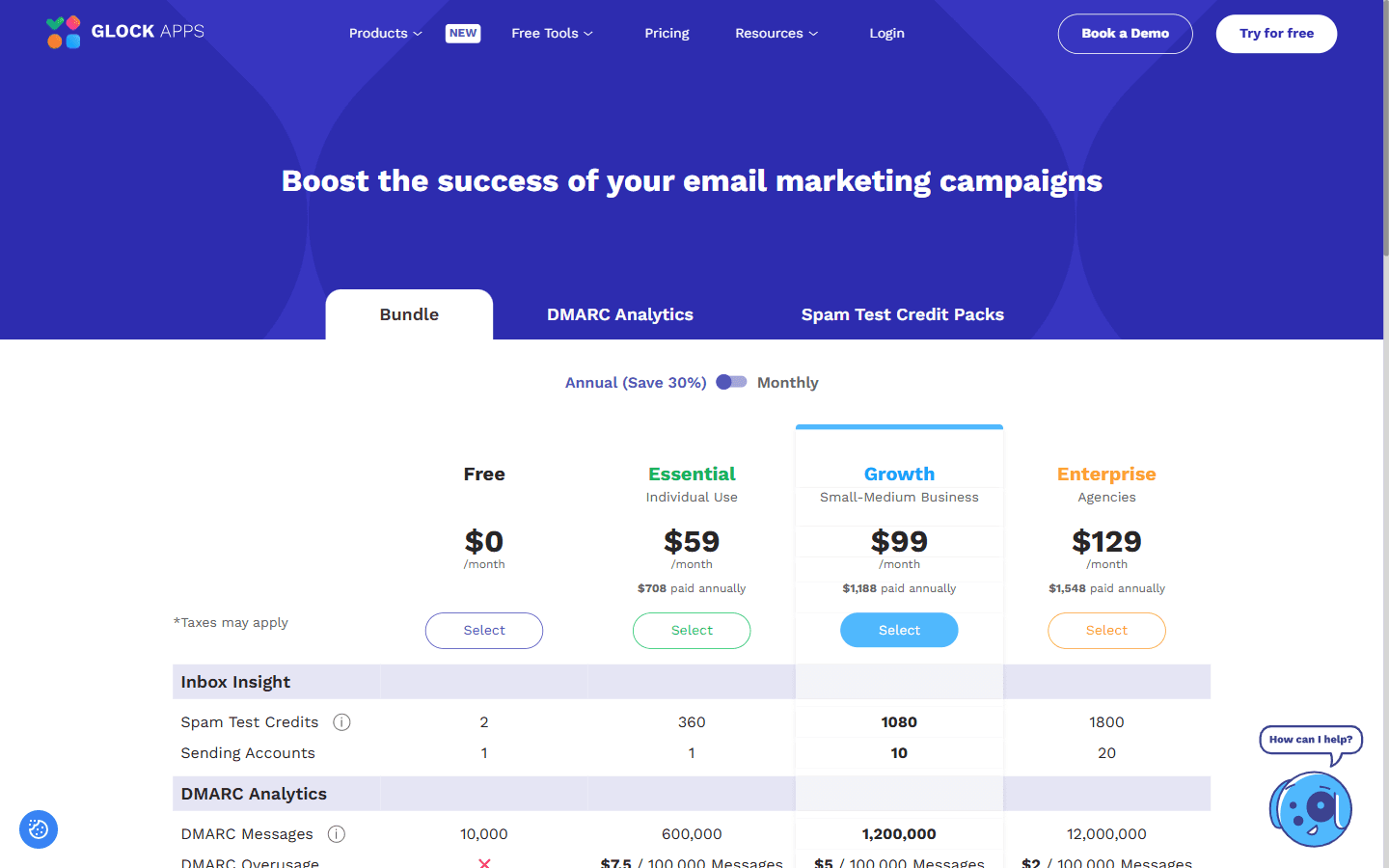
GlockApps publishes a free tier and three paid plans. The monthly prices and the "paid annually" totals below are quoted directly from the live pricing page (re-verified at the publication date). The page also exposes an "Annual (Save 30%)" billing toggle, so committing to annual billing cuts the effective cost roughly 30% below the monthly rate — the "paid annually" column shows the standard yearly total at the monthly rate, before that discount.
| Plan | Monthly | Paid annually (at monthly rate) | Spam-test credits | Sending accounts | IP reputation monitors | DMARC messages / mo |
|---|---|---|---|---|---|---|
| Free | $0 | $0 | 2 | 1 | 1 | 10,000 |
| Essential | $59 | $708 / yr | 360 | 1 | 10 | 600,000 |
| Growth | $99 | $1,188 / yr | 1,080 | 10 | 20 | 1,200,000 |
| Enterprise | $129 | $1,548 / yr | 1,800 | 20 | 25 | 12,000,000 |
A few notes on what the line items actually mean:
GlockApps bundles a handful of distinct tools under one subscription:
GlockApps deserves real credit: unlike pure warmup tools, it actually monitors. IP reputation, blacklists, DMARC, and uptime are continuous signals, not one-off tricks. That makes it genuinely useful, and more honest than tools that promise warmup will fix everything.
But the honest limitation is in the name of what it does: GlockApps observes; it does not act. It will show you that you are landing in spam, that an IP is blacklisted, or that DMARC is failing — but fixing those problems, and warming the mailboxes, sourcing clean domains, and maintaining the infrastructure, is on you. The placement tests are also seed-list based and consume credits, so they are samples you run on demand, not a complete real-world picture of every campaign. GlockApps is an excellent dashboard for infrastructure you own and operate elsewhere; it is not that infrastructure, and it does not remediate on your behalf.
The summary below reflects GlockApps' publicly advertised strengths and limitations as a diagnostics and monitoring platform.
Pros
Cons
Good fit:
Bad fit:
If you arrived here while shopping for deliverability tooling, the realistic alternatives split into two camps: other diagnostics tools, and infrastructure providers that pair monitoring with the mailboxes themselves. The table below is oriented to an email reader; verify current pricing directly with each provider.
| Option | What it is | Strength | Best for |
|---|---|---|---|
| GlockApps | Placement testing + monitoring | Affordable, broad diagnostics | Deliverability testing across many domains |
| MailReach | Warmup + spam test | Human-like warming | Standalone warmup |
| Folderly | Full-service deliverability | Audits + expert remediation | Revenue-critical email programs |
| InboxKit | Mailbox infrastructure + InfraGuard add-on | Mailboxes paired with continuous monitoring | Teams that want detection and the infrastructure under one vendor |
The honest positioning: GlockApps is a deliverability dashboard, and InboxKit pairs that kind of monitoring with the infrastructure itself. GlockApps tells you an IP is blacklisted or DMARC is failing on mailboxes you run elsewhere, then leaves the fix to you. InboxKit provides the mailboxes and offers InfraGuard — a continuous-monitoring add-on (first month free, then a paid add-on per the InboxKit pricing page) with real-time blacklist alerts, DNS drift detection, and bounce-rate alerting tied directly to the infrastructure it manages — so detection and the healthy infrastructure can live under one vendor. GlockApps is a great diagnostic layer; InboxKit removes the gap between detecting a problem and owning the infrastructure that has it. Disclosure: InboxKit is the publisher of this review.
Editorial rating: 8 / 10
In our view, GlockApps is one of the more honest tools in the deliverability-testing space at this price point: real placement tests, genuine IP reputation and DMARC monitoring, and a free tier that actually helps. For seeing where your email lands and catching reputation issues early, it is competitive at the price.
It is not higher because it only observes. It diagnoses and monitors but does not warm, fix, or provide infrastructure, so it is one more subscription that surfaces problems you then have to solve yourself on mailboxes you manage elsewhere. The placement tests are seed-list samples and consume credits; the monitoring alerts you but does not act.
If you would rather pair that kind of monitoring with the mailboxes themselves under one vendor, see how InboxKit compares.
Per the live pricing page at the publication date: Free at $0, Essential at $59/month, Growth at $99/month, and Enterprise at $129/month. Annual billing is 30% off across the paid tiers. Plans differ on spam-test credits (2 / 360 / 1,080 / 1,800), sending accounts (1 / 1 / 10 / 20), IP reputation monitors (1 / 10 / 20 / 25), and DMARC message volume (10K / 600K / 1.2M / 12M per month). DMARC overage fees apply on paid plans beyond plan limits.
No. GlockApps is a testing and monitoring tool, not a warmup tool or a sender. It measures deliverability and surfaces reputation problems; it does not build reputation, warm inboxes, or send campaigns. Warmup is a separate product category.
A seed-list test that sends to a set of known addresses across providers (Gmail, Outlook, Yahoo, and others) and reports whether you landed in inbox, spam, or promotions, along with content, authentication, and link analysis. Each test consumes a credit from your plan's monthly allowance.
Yes. It includes IP reputation and blacklist monitoring across major lists, DMARC analytics across unlimited domains on every paid plan, and uptime monitors. That is more continuous monitoring than warmup tools typically offer, but it is observational — GlockApps alerts you to issues; it does not auto-pause mailboxes or remediate them.
No. GlockApps tests and monitors infrastructure you source and operate elsewhere — Google Workspace, Microsoft 365, dedicated SMTP, or any other sender. Remediation is up to you. If you want mailboxes paired with continuous monitoring under one vendor, look at email infrastructure providers such as InboxKit (publisher of this review; InboxKit offers InfraGuard as an add-on, first month free).
Free tools and pages that go with this guide.
 Guides
 Rahul LakhaneyGuidesRahul LakhaneyGuidesRahul LakhaneyEducationalRahul Lakhaney
From $2.50/mailbox/mo. No plans or slots. Automated DNS, warmup, and InfraGuard monitoring included.