
LearnGuides
How to Buy Pre-Warmed Email Accounts: The Honest 2026 Buyer's Guide

By Mohit MimaniPublished on: Apr 11, 2026 · Updated: Oct 8, 2026 · 12 min read · Last reviewed: Oct 2026
TL;DR
Pre-warmed email accounts are a legitimate category with a wide quality range. Here is what to verify, what to pay, and which providers actually ship what they sell.
Pre-warmed email accounts solve exactly one problem: the 14-21 day warmup window between provisioning a new mailbox and sending the first real email. Everything else about cold outbound: list quality, message copy, volume discipline, domain rotation: has to be handled separately.
If your launch date is more than 21 days out, the answer is almost always to buy a standard mailbox and self-warm it. Self-warmup on an isolated network produces slightly better first-month inbox placement than pre-warmed on the same network, and the total cost is lower. See pre-warmed mailboxes vs self-warmup for the full decision framework and are pre-warmed mailboxes worth it for the prior-year honest analysis.
If you are buying pre-warmed because the campaign launches next week or because you are replacing burned mailboxes mid-campaign, read on. The rest of this article is the practical checklist for picking a provider and avoiding the low-quality end of the market.
Here is the list of providers actually shipping pre-warmed email accounts in April 2026, what they offer, and what the per-mailbox math looks like. Pricing pulled live from provider sites where publicly listed.
| Provider | Pre-warmed Google Workspace | Pre-warmed Microsoft 365 | Per-mailbox pricing | Warmup network |
|---|---|---|---|---|
| InboxKit | Yes | Yes | $6-9/mailbox from Prewarm Inventory (varies by domain age: 2-4 wk = $6, 4-8 wk = $7, 8+ wk = $9) + domain transfer | Isolated |
| Zapmail | Yes | Yes | Not publicly listed (claims 12 weeks warmup) | Shared pool (from public testimonials) |
| Primeforge | No: sells standard accounts, self-warm on Warmforge | No: same | ~$6.50 with Warmforge add-on | Shared pool (Warmforge) |
| Mailforge | No: shared-IP relays, not real accounts | No | N/A | N/A |
| Instantly | No: shared-pool warmup built into sequencer | No | Bundled | Shared pool |
| Smartlead | No: shared warmup only | No | Bundled | Shared pool |
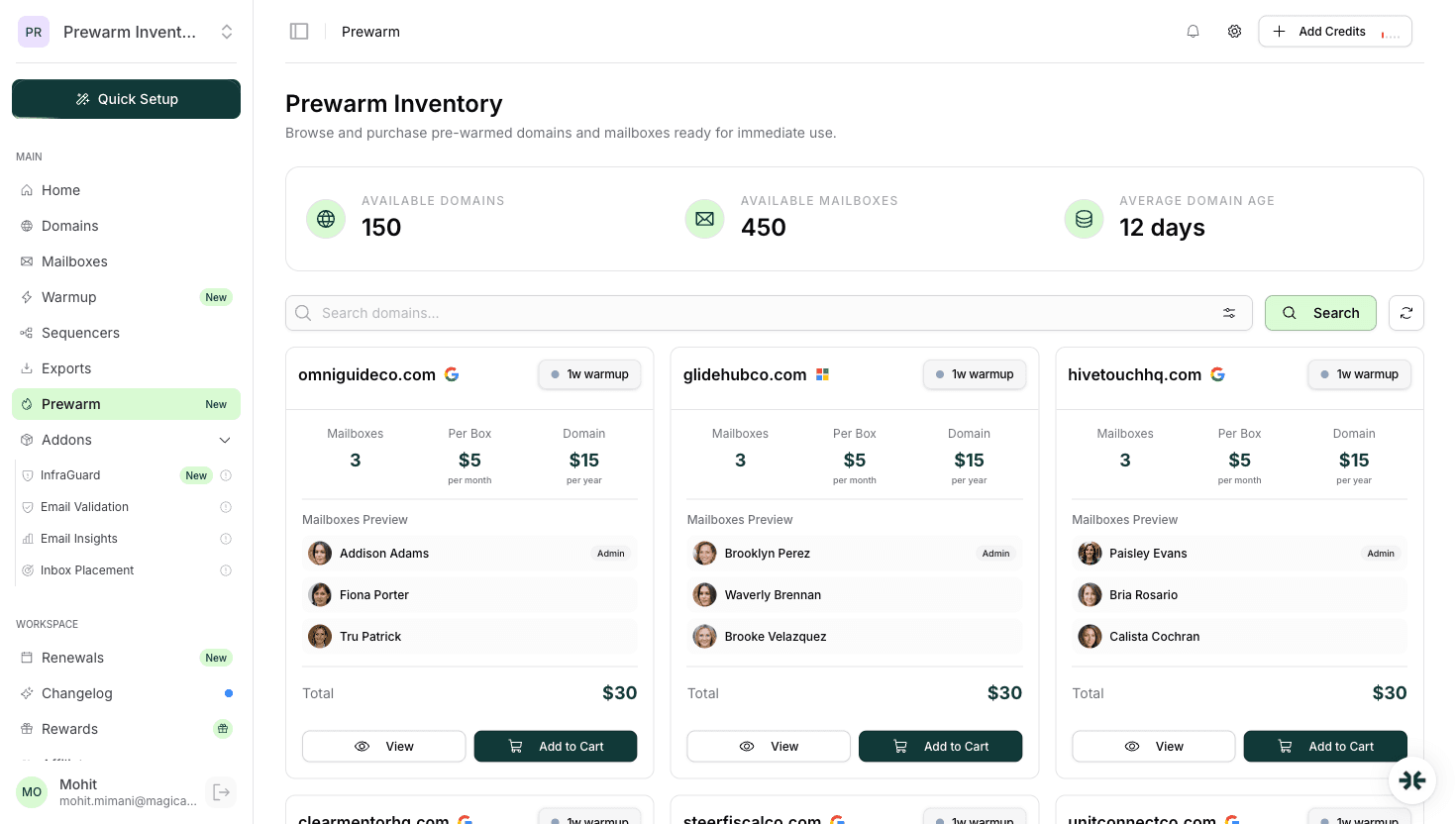
The short reading: two providers actually sell pre-warmed real accounts at scale: InboxKit and Zapmail, and both ship Google Workspace and Microsoft 365. InboxKit sells pre-warmed mailboxes through a dedicated Prewarm Inventory section in the dashboard, with per-mailbox pricing based on domain age ($6-9/mailbox plus domain transfer costs). Zapmail also offers pre-warmed mailboxes but does not publicly list pricing.
Read the product comparisons at InboxKit vs Zapmail, InboxKit vs Primeforge, and Zapmail pricing.
Pre-warmed is a category with a wide quality range. Before you pay any provider, verify seven things. Any provider who cannot answer all seven cleanly is selling something less than what the category label implies.
The category has legitimate providers and a long tail of providers selling something weaker than the label suggests. Walk away if you see any of these:
Here is what pre-warmed email accounts actually cost on InboxKit in April 2026 at the scales most buyers operate at. All figures are one-time per-mailbox costs from the Prewarm Inventory, not monthly subscription fees. Domain transfer costs (e.g. .com = $15) are additional.
InboxKit Prewarm Inventory pricing (per mailbox, one-time):
| Domain age / warmup duration | Per-mailbox cost |
|---|---|
| 2-4 weeks warmup | $6/mailbox |
| 4-8 weeks warmup | $7/mailbox |
| 8+ weeks warmup | $9/mailbox |
These are purchased separately from InboxKit's monthly mailbox billing. Regular InboxKit mailboxes are billed per mailbox, from $2.50/mailbox/mo with no minimum; the Prewarm Inventory is a separate purchase flow for already-warmed mailboxes on aged domains.
Zapmail also offers pre-warmed mailboxes but does not publicly list per-mailbox pricing, so a direct cost comparison is not possible at time of writing. Zapmail claims 12 weeks of warmup on their pre-warmed mailboxes.
InboxKit includes InfraGuard monitoring, 24+ sequencer integrations, and Azure mailbox availability ($30/tenant/mo). Read the full pricing teardowns at InboxKit pricing and Zapmail pricing.
If you have verified the checklist and picked a provider, the order flow should look like this. The entire process from click to first real send is under two hours on a disciplined provider.
A pre-warmed mailbox is not a shield against the things that actually burn email domains. The most common failure modes after buying pre-warmed:
Pre-warming solves one problem. The rest of the work is still yours.
For most buyers in April 2026, InboxKit is the recommended pre-warmed email account provider. The short case:
For the product overview read InboxKit pre-warmed mailboxes and what is InboxKit.
Zapmail is a legitimate second choice if you want a sequencer-friendly pre-warmed offering with a large install base of existing users. Zapmail claims 12 weeks of warmup on their pre-warmed mailboxes, though pricing is not publicly listed. The trade-off is the lack of isolated warmup network architecture. Read Zapmail review for the longer take.
Primeforge is the right call if you want real Google Workspace or Microsoft 365 accounts and are willing to self-warm via Warmforge instead of buying pre-warmed. The total cost and time tradeoff comes out similar to InboxKit's pre-warmed offering after the 14-21 day warmup completes.
Pre-warmed email accounts are a legitimate category with a wide quality range. In April 2026 the two real providers are InboxKit and Zapmail, both shipping real Google Workspace and Microsoft 365 accounts. InboxKit sells pre-warmed mailboxes through a dedicated Prewarm Inventory at $6-9/mailbox based on domain age, while Zapmail offers pre-warmed mailboxes with pricing not publicly listed.
The quality signal that matters most is the warmup network architecture. Isolated beats shared pool by roughly 9 percentage points on first-month inbox placement, and the difference shows up in your reply rate. Verify every item on the seven-point quality checklist before paying any provider.
Finally: pre-warming solves one problem. Bad lists, weak copy, and over-volume sending will still burn your domains. Buy pre-warmed when time is genuinely the constraint, and spend the rest of your effort on the list, the copy, and the send discipline.
InboxKit is the recommended provider for most buyers: real Google Workspace and Microsoft 365 accounts, isolated warmup network, dedicated Prewarm Inventory ($6-9/mailbox based on domain age), and InfraGuard monitoring included. Zapmail is a legitimate second choice with a larger install base, though their pre-warmed pricing is not publicly listed.
On InboxKit, pre-warmed mailboxes cost $6-9 per mailbox from the Prewarm Inventory, depending on domain age and warmup duration (2-4 wk = $6, 4-8 wk = $7, 8+ wk = $9), plus domain transfer costs. Zapmail does not publicly list pre-warmed pricing. Anything significantly below $6/mailbox from any provider is likely a shared-IP relay being sold as 'pre-warmed' or a mailbox with less than 14 days of warmup traffic.
No, not on quality: self-warmed mailboxes on an isolated network produce slightly better first-month inbox placement than pre-warmed on the same network. Pre-warmed is better on time-to-send: same-day vs 14-21 day wait. Choose based on whether your launch date allows the runway.
Providers who cannot disclose what warmup network the pre-warm ran on. Isolated networks produce ~92% first-month inbox placement; shared pools produce ~83%. A provider charging premium pricing on a shared-pool warmup is overcharging. Ask the question explicitly and get a clear answer before paying.
Yes, but the category is narrower than Google Workspace. InboxKit is the clearest answer: pre-warmed Microsoft 365 mailboxes available from the Prewarm Inventory at the same per-mailbox pricing as Google Workspace ($6-9 based on domain age). Zapmail also offers pre-warmed Microsoft 365 mailboxes. Most other providers are Google-only.
Pause immediately and investigate. Common causes: dirty list data (bounces), weak copy (spam classification), over-volume (rate-limited), domain reputation problem (domain too new or flagged). Warmup does not fix these, they are list, copy, and discipline issues. Read emails-landing-in-promotions-tab and why-emails-go-to-spam for diagnosis.
Free tools and pages that go with this guide.
 Guides
 Mohit MimaniEducational
 Rahul LakhaneyComparisonsMohit MimaniComparisonsMohit Mimani
From $2.50/mailbox/mo. No plans or slots. Automated DNS, warmup, and InfraGuard monitoring included.