
LearnGuides
Pre-Warmed Google Workspace Accounts: Who Sells Them and What They Actually Cost

By Mohit MimaniPublished on: Apr 11, 2026 · Updated: Oct 8, 2026 · 10 min read · Last reviewed: Oct 2026
TL;DR
Pre-warmed Google Workspace mailboxes ship ready to send on day one. The 2026 buyer's guide to who sells them, what they cost, and how the two main providers compare.
A pre-warmed Google Workspace account is a real, admin-accessible Gmail business mailbox on a real domain that has been run through 14-16 days of warmup traffic on an isolated network before you take delivery. When it lands in your dashboard, the reputation signal is already trending positive, SPF/DKIM/DMARC are already configured, and you can connect it to a sequencer and start cold outbound on the same day.
The shortcut that matters for buyers: you are not buying a relay, a shared-IP SMTP account, or a legacy educational workspace. You are buying the exact same Google Workspace Business Starter account you would have provisioned yourself, with the 14-16 day warmup already done for you. If the provider is offering anything else and calling it 'pre-warmed Google Workspace,' keep shopping.
Google Workspace mailboxes land in primary inbox at higher rates than shared-IP alternatives because Gmail's spam classifier treats Google-authenticated sending traffic as a different signal class than third-party relays. When a Google Workspace mailbox sends to a Gmail recipient, the authentication chain is tight, DKIM signed by Google, SPF aligned to Google's sending IPs, DMARC enforced against the domain, and the recipient provider is itself Google, which is the same classifier deciding whether the message is spam.
That matters because 55-65% of B2B email recipients are on Gmail or Google Workspace. Sending from a real Google Workspace account to a Gmail recipient aligns the authentication signal with the recipient's ESP, and Gmail's filter rewards the match. The difference shows up in inbox placement tests consistently at 5-10 percentage points.
The trade-off is that new Google Workspace accounts require warmup. Gmail's filter is explicit about this, Google's sender guidelines recommend that senders of over 5,000 messages per day to Gmail recipients gradually ramp volume and authenticate every message. A cold mailbox with no history that sends 40 emails on day one hits the spam folder hard and fast. Pre-warming sidesteps the ramp by doing it before you buy.
As of April 2026, two providers dominate the pre-warmed Google Workspace category at commercial scale: InboxKit and Zapmail. They take different approaches to pricing and packaging.
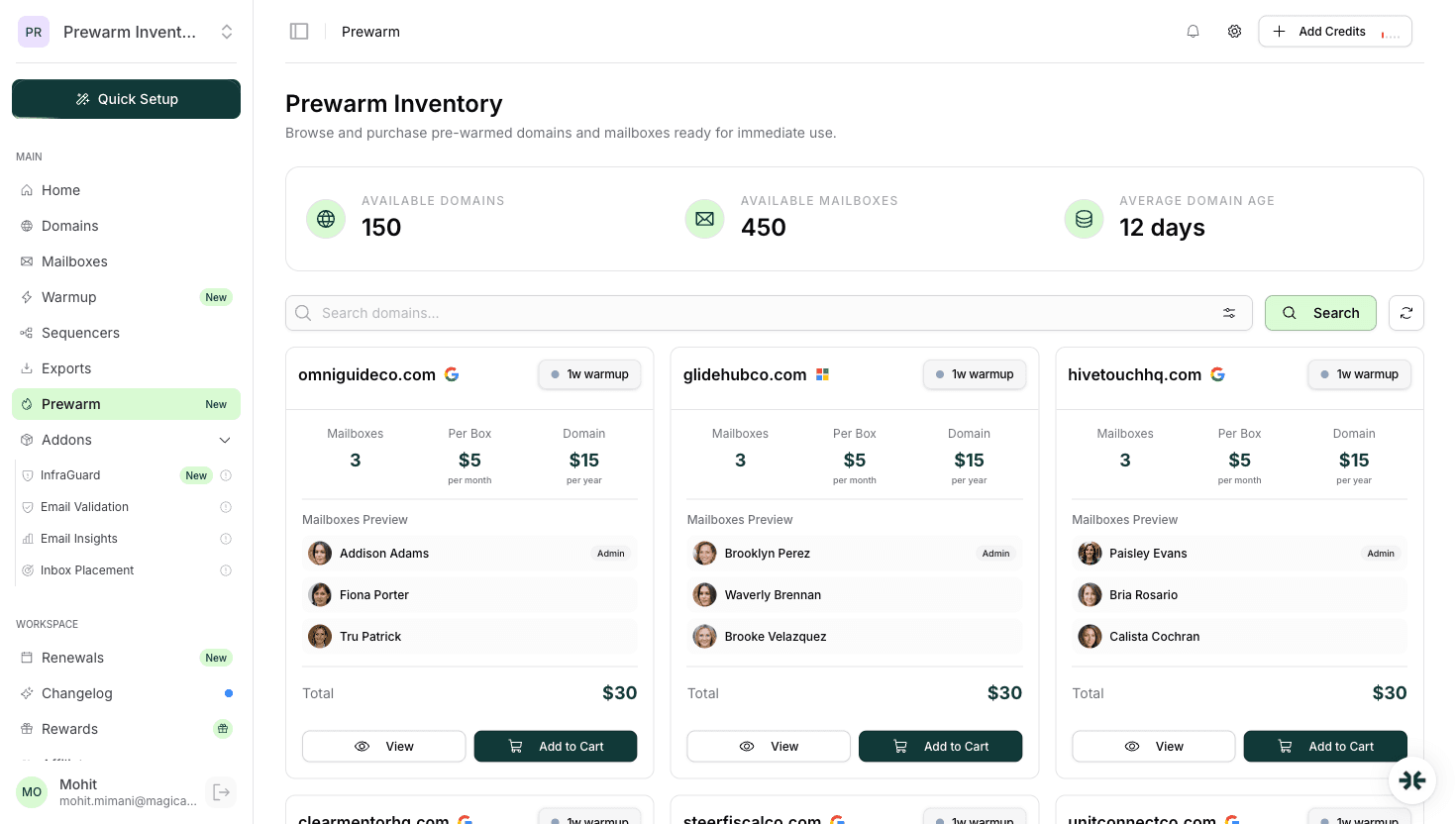
InboxKit offers a dedicated Prewarm Inventory section in the dashboard where you browse available pre-warmed mailboxes on aged domains and purchase them outright at per-mailbox pricing based on domain age:
| Warmup duration | Per-mailbox price |
|---|---|
| 2-4 weeks warmup | $6/mailbox |
| 4-8 weeks warmup | $7/mailbox |
| 8+ weeks warmup | $9/mailbox |
Domain transfer costs apply separately (e.g. .com = $15). These are already-warmed mailboxes on aged domains: a distinct product section, not an add-on to a standard mailbox subscription.
Zapmail also offers pre-warmed mailboxes and claims 12 weeks of warmup on its pre-warmed inventory. Zapmail's pre-warmed pricing is not publicly listed on its site, so direct per-mailbox cost comparison requires contacting their sales team.
See the full plan teardowns in Zapmail pricing and InboxKit pricing, or the direct head-to-head in InboxKit vs Zapmail.
Not all pre-warmed Google Workspace offerings are equivalent. Before you pay the premium, verify the mailbox ships with every item on this checklist, if any are missing, you are buying less than the category claims:
InboxKit, Zapmail, and Primeforge all meet the first five items on real Google Workspace accounts. The difference shows up at items 6 and 7 (one-domain-per-workspace isolation) and on the underlying warmup network quality.
A well-run pre-warmed Google Workspace workflow should look like this from click to first email:
End-to-end that is under two hours of human time, and the first real send can go out on the same day the mailbox lands. Compared to 14-16 days of self-warmup, the time savings is the entire value proposition.
Pre-warmed Google Workspace is not magic. Here are the things the category does not solve and the things worth understanding before you buy:
What it does not solve:
What to watch for:
If you are choosing between pre-warmed Google Workspace and pre-warmed Microsoft 365, the answer depends on your ICP. A rough rule: match your sender ESP to your recipient ESP class when you can.
The deeper comparison lives in Google Workspace vs Microsoft 365 for email. For the Microsoft-specific angle, read pre-warmed Microsoft 365 mailboxes.
Pre-warmed Google Workspace accounts are worth the money when you can verify five things:
InboxKit meets all five via its Prewarm Inventory, with per-mailbox pricing from $6-9 depending on domain age. Zapmail meets the first four but does not publicly list its pre-warmed pricing. Most other providers in the category either do not offer pre-warmed Google Workspace at all (Mailforge, Primeforge) or bundle pre-warming into a sequencer-locked workflow (Instantly, Smartlead) where the mailbox cannot leave the platform.
For the full buyer workflow, read the buy pre-warmed email accounts guide and the honest are pre-warmed mailboxes worth it analysis.
Pre-warmed Google Workspace accounts solve the time-to-send problem for email, 14-16 days of warmup collapsed to zero. InboxKit offers a dedicated Prewarm Inventory where you purchase already-warmed mailboxes on aged domains at $6-9/mailbox depending on domain age, plus domain transfer costs. Zapmail also offers pre-warmed mailboxes with 12 weeks of claimed warmup, though its pre-warmed pricing is not publicly listed. Both approaches skip the warmup wait entirely.
For a shopping-focused deep dive, read InboxKit pre-warmed mailboxes. For the comparison-focused breakdown, read Zapmail prewarm vs InboxKit prewarm.
InboxKit prices pre-warmed mailboxes in its Prewarm Inventory at $6/mailbox (2-4 weeks warmup), $7/mailbox (4-8 weeks), or $9/mailbox (8+ weeks), plus domain transfer costs. Zapmail also offers pre-warmed mailboxes with 12 weeks of claimed warmup, but its pre-warmed pricing is not publicly listed.
Yes, at the Google layer. It is a real Business Starter account with admin access, identical in every product way to one you would provision yourself. The difference is that the provider has already run 14-16 days of warmup traffic through it before handing it to you.
No. Pre-warming handles the initial reputation ramp, but ongoing spam folder risk is dominated by list quality, message copy, and volume discipline. A pre-warmed mailbox sending to a dirty list with weak copy at 200/day will hit spam folder within the first week regardless of warmup state.
Google recommends gradual volume ramp for any new sender. 14-16 days is the practical minimum for safe email sending from a fresh Google Workspace mailbox. Microsoft 365 takes 17-21 days because its filter is more conservative on new senders. Pre-warming lets the provider do this before handoff so you do not wait.
Yes. Self-warmup is the default: buy the mailbox, attach it to a warmup network (ideally isolated, not shared pool), and wait 14-16 days. Isolated warmup networks produce ~92% first-month inbox placement versus ~83% on shared pools. If you prefer to skip the wait, InboxKit's Prewarm Inventory offers already-warmed mailboxes on aged domains starting at $6/mailbox. See the email warmup guide for the full mechanics.
The mailbox is designed to handle that transition, that is the whole value proposition. Best practice is still to start at 20-30 messages per mailbox per day and ramp by 10% daily over the first week. Do not send 200 emails from hour one even on pre-warmed accounts.
Free tools and pages that go with this guide.
 Guides
 Mohit MimaniComparisonsMohit MimaniEducational
 Saksham JainEducational
 Rahul Lakhaney
From $2.50/mailbox/mo. No plans or slots. Automated DNS, warmup, and InfraGuard monitoring included.