
LearnComparisons
Zapmail Pre-Warm vs InboxKit Pre-Warm: Real Pricing, Real Tradeoffs

By Mohit MimaniPublished on: Apr 11, 2026 · Updated: Oct 8, 2026 · 11 min read · Last reviewed: Oct 2026
TL;DR
Both Zapmail and InboxKit offer pre-warmed mailboxes with different approaches and pricing. Head-to-head with real pricing, real quality metrics, and the honest call on which one wins.
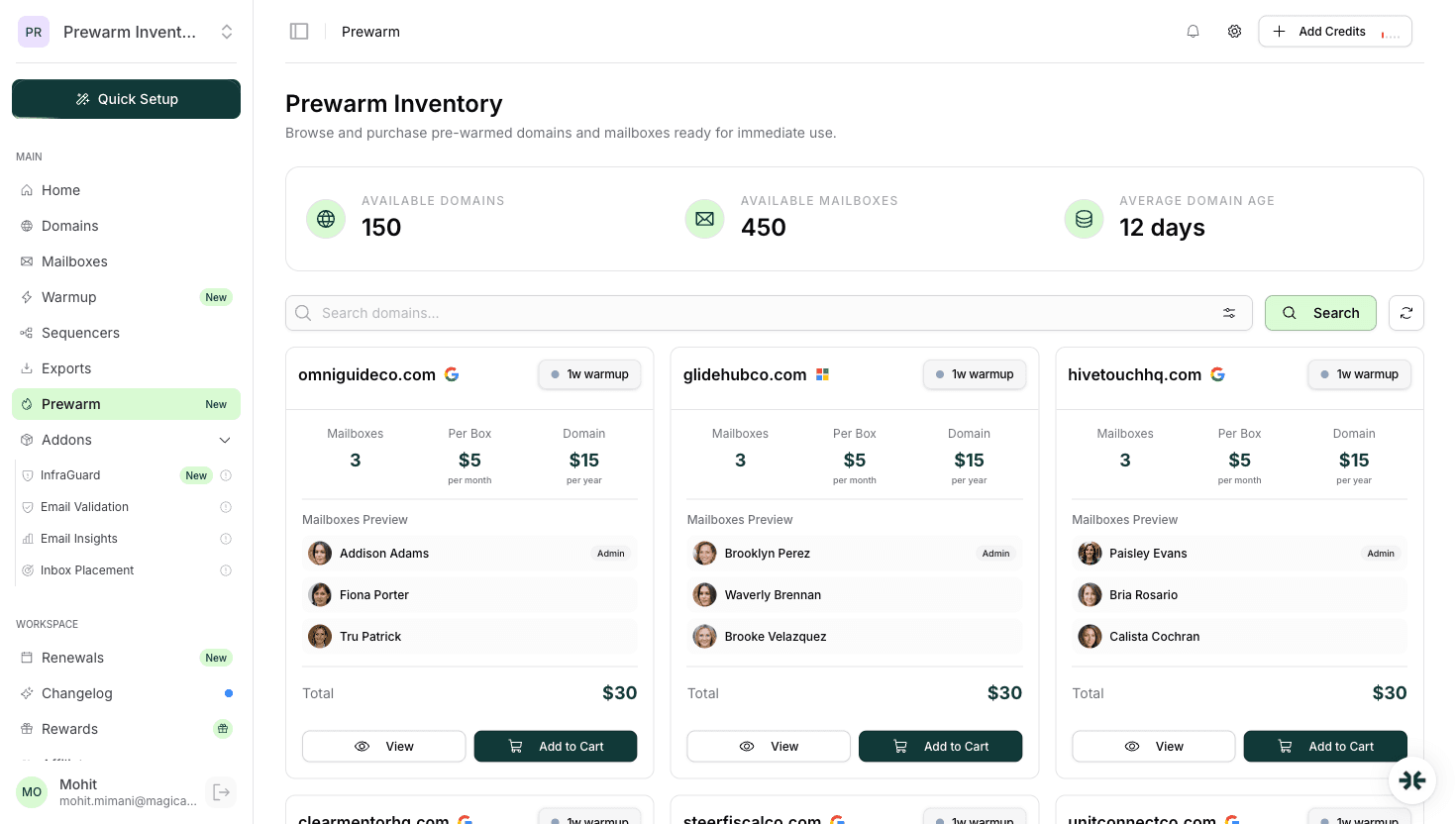
Both Zapmail and InboxKit offer pre-warmed mailboxes, but with fundamentally different purchasing models. InboxKit has a dedicated Prewarm Inventory section in the dashboard where you browse available pre-warmed domains and purchase them outright at per-mailbox pricing based on domain age: $6/mailbox (2-4 weeks warmup), $7/mailbox (4-8 weeks warmup), or $9/mailbox (8+ weeks warmup), plus domain transfer costs (e.g. .com = $15). Zapmail also offers pre-warmed mailboxes, but its pre-warmed pricing is not publicly listed and requires login to view. Zapmail claims 12 weeks of warmup.
The honest call: InboxKit wins on transparency and value because the pre-warmed pricing is public, the purchasing model is straightforward, and the isolated warmup network is a meaningful quality advantage over shared-pool alternatives. Zapmail remains a credible choice if you are already on its platform, value its large install base, or prefer its UX, but on pricing transparency and warmup quality, InboxKit is the better buy in April 2026.
The rest of this article is the full head-to-head with real data.
InboxKit pre-warmed pricing is publicly listed on the Prewarm Inventory section of the dashboard. Zapmail's pre-warmed pricing requires login and is not publicly listed as of April 2026. Zapmail claims 12 weeks of warmup on its pre-warmed mailboxes.
InboxKit Prewarm Inventory pricing (per mailbox, one-time purchase):
| Warmup Duration | Per-Mailbox Price |
|---|---|
| 2-4 weeks | $6/mailbox |
| 4-8 weeks | $7/mailbox |
| 8+ weeks | $9/mailbox |
Plus domain transfer costs (e.g. .com = $15). Pre-warmed mailboxes are purchased from the Prewarm Inventory, a separate section in the dashboard where you browse available pre-warmed domains and buy them outright.
Zapmail pre-warmed pricing:
Zapmail's pre-warmed pricing is gated behind login and is not publicly visible on zapmail.ai as of April 2026. We cannot provide a direct dollar comparison without verified pricing. Zapmail claims 12 weeks of warmup duration.
The signal: InboxKit's pre-warmed pricing is transparent and publicly available. The isolated warmup network, InfraGuard monitoring, 24+ integrations, and Azure mailbox option are additional advantages that Zapmail's offering does not publicly match.
For the full Zapmail teardown read Zapmail pricing. For InboxKit's per-mailbox rates read InboxKit pricing.
Microsoft 365 is the underserved half of the pre-warmed category. Most providers sell Google Workspace only. Here is how the two providers handle M365 in April 2026:
InboxKit: pre-warmed Microsoft 365 available at the same per-mailbox rates as pre-warmed Google Workspace in the Prewarm Inventory. Same dashboard, same purchasing flow, browse available pre-warmed domains and buy outright at $6-$9/mailbox depending on warmup duration, regardless of whether you pick Google, Microsoft, or a mix.
Zapmail: Zapmail lists Microsoft 365 as an option on its pricing page, but pre-warmed pricing for M365 is not publicly visible without login (as of April 2026). Whether Microsoft pre-warmed is priced identically to Google pre-warmed requires individual verification per order.
For buyers who need pre-warmed Microsoft 365 specifically, enterprise, legal, financial services, EU-heavy B2B, the InboxKit answer is clearer. Read pre-warmed Microsoft 365 mailboxes for the broader buying guide.
Both providers ship real Google Workspace Business Starter accounts (not shared-IP relays, not legacy educational accounts, not reseller-shared tenants). This is the baseline that separates them from the bottom half of the category.
The differentiating details at the account level:
| Feature |  Zapmail Zapmail |  InboxKit InboxKit |
|---|---|---|
| Real Google Workspace | Yes | Yes |
| Real Microsoft 365 | Yes (partial visibility on prewarm pricing) | Yes (same prewarm pricing as GW) |
| Admin access to workspace | Yes | Yes |
| US/EU IP | Yes | Yes (US default) |
| One domain per workspace | Yes | Yes |
| Automated DNS (SPF/DKIM/DMARC/MX) | Yes | Yes (Cloudflare, <60s) |
| Azure mailboxes | No | Yes ($30/tenant/mo) |
| Pre-warmed warmup duration | Claims 12 weeks | 2-4 weeks, 4-8 weeks, or 8+ weeks (isolated network, priced by tier) |
| Custom tracking domain | Yes | Yes |
Both providers are in the upper half of the market on account quality. The one InboxKit advantage that actually matters for production use is the Azure mailbox option. Azure mailboxes at $30 per tenant per month is a cost-effective way to add provider diversity beyond Google and Microsoft without paying per-mailbox Microsoft 365 pricing for the whole batch, since each tenant holds up to 100 mailboxes.
Once the mailbox is in your hands, you have to connect it to a sequencer to actually send. Integration breadth and quality matter because they determine how much manual wiring you do per mailbox.
InboxKit: 24+ native one-click OAuth exports. Instantly, Smartlead, Salesforge, Reply.io, Lemlist, Woodpecker, Saleshandy, Emailbison, ReachInbox, SendKit, Manyreach, Supersend, BrandJet, Snov.io, Emelia, PlusVibe, Za-Zu, and more. The mailbox is in the sequencer within 30 seconds of click.
Zapmail: the homepage claims 50+ outreach tool integrations, with named support for Instantly, Smartlead, ReachInbox, Reply, Lemlist. Verified integration count varies by source. OAuth integration works for the named tools.
For buyers running single-sequencer workflows, both providers cover the common cases. For agencies running multi-sequencer workflows across different clients, InboxKit's explicit 24+ list is easier to plan against.
Read email sequencer integration guide for longer integration comparisons.
This is where the two providers diverge most clearly.
InboxKit InfraGuard: 6-hour blacklist checks across Spamhaus, Spamcop, Barracuda, and others. Continuous DNS monitoring. Auto-pause on reputation drops or blacklist hits. Per-domain pricing, first month free. Shipped as part of the core product, not a separate add-on you buy later.
Zapmail: the public product surface mentions ZapShield as a feature under the 'Features' navigation, but monitoring architecture, frequency, and auto-pause semantics are not disclosed publicly on the pricing page. The 2026 review of the product on Zapmail review covers what is known.
For production email programs, post-handoff monitoring is not optional. It is the difference between catching a blacklist hit in 6 hours and catching it three days later after the campaign has burned. If InfraGuard-equivalent monitoring is not explicitly part of the package, you are buying a deliverability blind spot.
Zapmail has been shipping for longer and has a larger install base among email agencies. Its UX is polished, its dashboard is well-known to most operators in the space, and its documentation and support have a strong reputation. Testimonials on the zapmail.ai homepage from agency founders specifically call out reliability, transparency, and responsive support.
InboxKit is newer and has built its product around a different philosophy, more features per mailbox, lower per-mailbox pricing, isolated warmup, and deeper monitoring. The UX is clean but may take experienced Zapmail users 10-15 minutes to re-learn because the menu organization and terminology differ.
For buyers who are already on Zapmail and are running production campaigns without deliverability issues, the switching cost is real. For new buyers evaluating pre-warmed providers with fresh eyes, InboxKit's pricing structure and quality advantages are the clearer answer.
Read InboxKit review and Zapmail review for the longer product takes.
Pick InboxKit if:
Pick Zapmail if:
The honest middle ground: For most buyers in April 2026, InboxKit is the better value thanks to transparent pricing, isolated warmup, and InfraGuard monitoring. Zapmail remains a credible choice but does not publicly list its pre-warmed pricing or disclose its warmup architecture, making a direct value comparison harder for new buyers.
InboxKit offers pre-warmed mailboxes at $6-$9/mailbox through its dedicated Prewarm Inventory, with transparent pricing based on warmup duration. Zapmail's pre-warmed pricing requires login and is not publicly available. Beyond pricing, InboxKit's advantages include an isolated warmup network, InfraGuard monitoring, Azure mailbox option, and 24+ sequencer integrations. Zapmail remains a polished, well-supported product with a larger install base and claims 12 weeks of warmup duration.
For new buyers, InboxKit is the recommended answer based on pricing transparency and warmup quality. For existing Zapmail customers running production programs, the switching cost is real and the answer depends on whether your campaigns are hitting the inbox placement ceiling that isolated warmup would address.
For the product overview read InboxKit pre-warmed mailboxes. For the full head-to-head on the entire platform beyond prewarm, read InboxKit vs Zapmail and compare it to the prior-year analysis in are pre-warmed mailboxes worth it.
A direct price comparison is difficult because Zapmail does not publicly list its pre-warmed pricing. It requires login to view. InboxKit's pre-warmed pricing is public: $6/mailbox (2-4 weeks warmup), $7/mailbox (4-8 weeks warmup), or $9/mailbox (8+ weeks warmup) from the Prewarm Inventory, plus domain transfer costs. Without verified Zapmail pricing, we cannot confirm which is cheaper, but InboxKit's transparency is an advantage in itself.
Zapmail has not publicly disclosed its warmup network architecture. Based on pricing structure and industry norms, it is likely shared pool. InboxKit explicitly runs an isolated warmup network, closed seed pool, rate-limited to match sender guidelines, no cross-contamination from other users. The ~9 percentage point gap on first-month inbox placement between isolated and shared pool favors InboxKit.
InboxKit explicitly lists 24+ native OAuth integrations including Instantly, Smartlead, Salesforge, Reply.io, Lemlist, Woodpecker, Saleshandy, Emailbison, ReachInbox, SendKit, Manyreach, Supersend. Zapmail's homepage claims 50+ outreach tool integrations but verified count varies by source. For single-sequencer workflows both cover common cases; for multi-sequencer agencies, InboxKit's explicit list is easier to plan against.
Yes. The mailboxes you own on Zapmail stay with you. They are real Google Workspace accounts with your admin access. You can move outbound volume to InboxKit-provisioned mailboxes in parallel and decommission Zapmail mailboxes as their subscription renews. Budget 2-3 weeks for a clean migration so you do not disrupt active campaigns.
No. Zapmail sells Google Workspace and Microsoft 365 accounts. Azure mailboxes (at $30/tenant/mo) are an InboxKit-specific option for buyers who want provider diversity beyond the standard Google/Microsoft pairing.
Comparable on the account architecture, both ship real Google Workspace accounts with admin access. Different on the warmup network: InboxKit runs isolated warmup, which is measurably better than shared pool on first-month inbox placement. At 100 mailboxes the quality advantage is meaningful enough to move several hundred messages per day from spam to primary inbox.
Free tools and pages that go with this guide.
Comparisons Mohit MimaniGuidesMohit MimaniPricingMohit MimaniEducational
 Rahul Lakhaney
From $2.50/mailbox/mo. No plans or slots. Automated DNS, warmup, and InfraGuard monitoring included.