TL;DR
Launching a cold email campaign in under 4 hours is possible if you buy pre-warmed mailboxes, skip the list research phase, and run through the steps in the right order. Here is the full checklist.
The 4-Hour Reality Check
Launching a cold email campaign on the same day you start planning it is possible. It is not usually a good idea, and the campaigns that work best are the ones where you spend 2-3 weeks on list research, copy iteration, and sequencer setup before the first send. But if you are up against a launch date that genuinely cannot move, here is the playbook that gets a real campaign in the air in under 4 hours of work, and the honest tradeoffs of each shortcut.

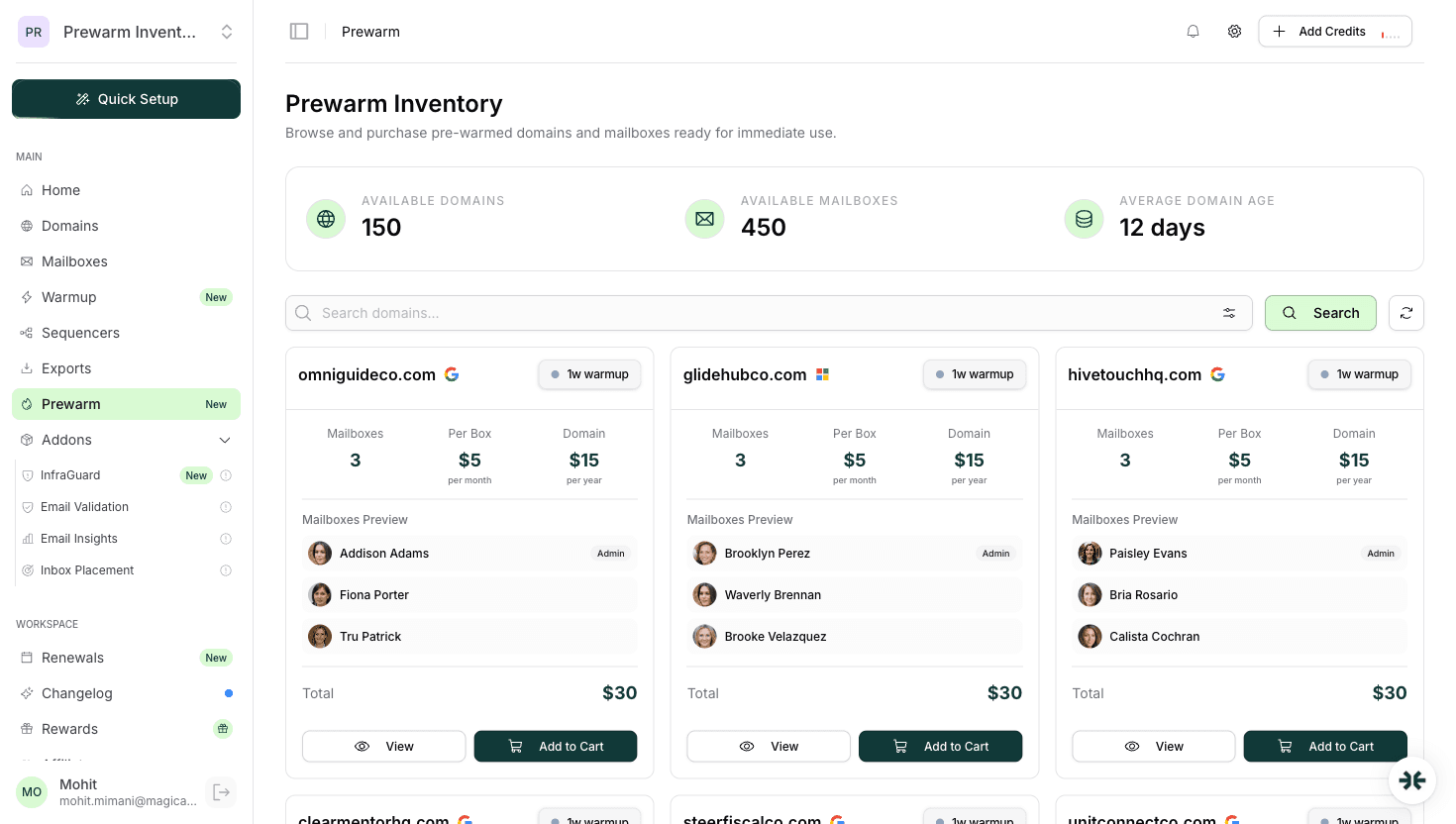
The single biggest lever is pre-warmed mailboxes. Everything else in this playbook assumes you start with real Google Workspace or Microsoft 365 accounts that already have 14-21 days of warmup traffic on record, pre-configured DNS, and native sequencer integrations. If you are starting with bare mailboxes, the playbook does not work. You will not be safely sending cold email in 4 hours. Read skip email warmup safely for why that path fails.
The playbook below assumes you have two things ready: a validated list of 500-2000 targets and a first-pass message draft. If you do not have those, the 4-hour timeline is not achievable. Budget another 2-4 hours for list preparation.
What Do You Need Before Launching a Same-Day Campaign?
Before the clock starts, confirm these five things are ready. Each one takes 10-60 minutes if you do not have it, and they all block the actual launch workflow:
- 1Target list in a clean format: CSV or Google Sheet with at minimum first name, last name, email, company. 500-2000 rows is the right size for a first same-day campaign. Any larger and you cannot validate deliverability before burning through the list; any smaller and you cannot get statistically meaningful engagement data.
- 2List verified through NeverBounce, ZeroBounce, or MillionVerifier. Remove all emails tagged as invalid, catch-all, or role-based (info@, sales@, contact@). Expect 10-20% of raw scraped lists to get stripped at this step. Sending to unverified lists burns mailboxes in 24-48 hours regardless of warmup state.
- 3First-pass message draft: subject line, body, and at least one follow-up. Keep the body under 80 words, avoid spam-trigger words, include one clear call to action. Plaintext-first formatting: no images, no excessive links, no HTML formatting tricks.
- 4Sender name and identity: the name, title, and company that will appear in the sending mailbox. For same-day launches, this is usually you personally or a deliberate pseudonym. Avoid generic names like 'Sales Team' that trigger spam classifiers.
- 5Campaign goal defined: what does a successful first day look like? Common answers are 5 positive replies, 10 booked meetings, 2% reply rate. Knowing this before you launch lets you know whether to scale or stop.
If any of these is missing, stop and fix it. A same-day launch with incomplete pre-flight is a same-day launch failure.
Hour 1: Provision Pre-Warmed Mailboxes
The first 60 minutes is entirely about getting pre-warmed mailboxes provisioned and handed off. This is the only step you cannot speed up beyond the provider's inventory availability.
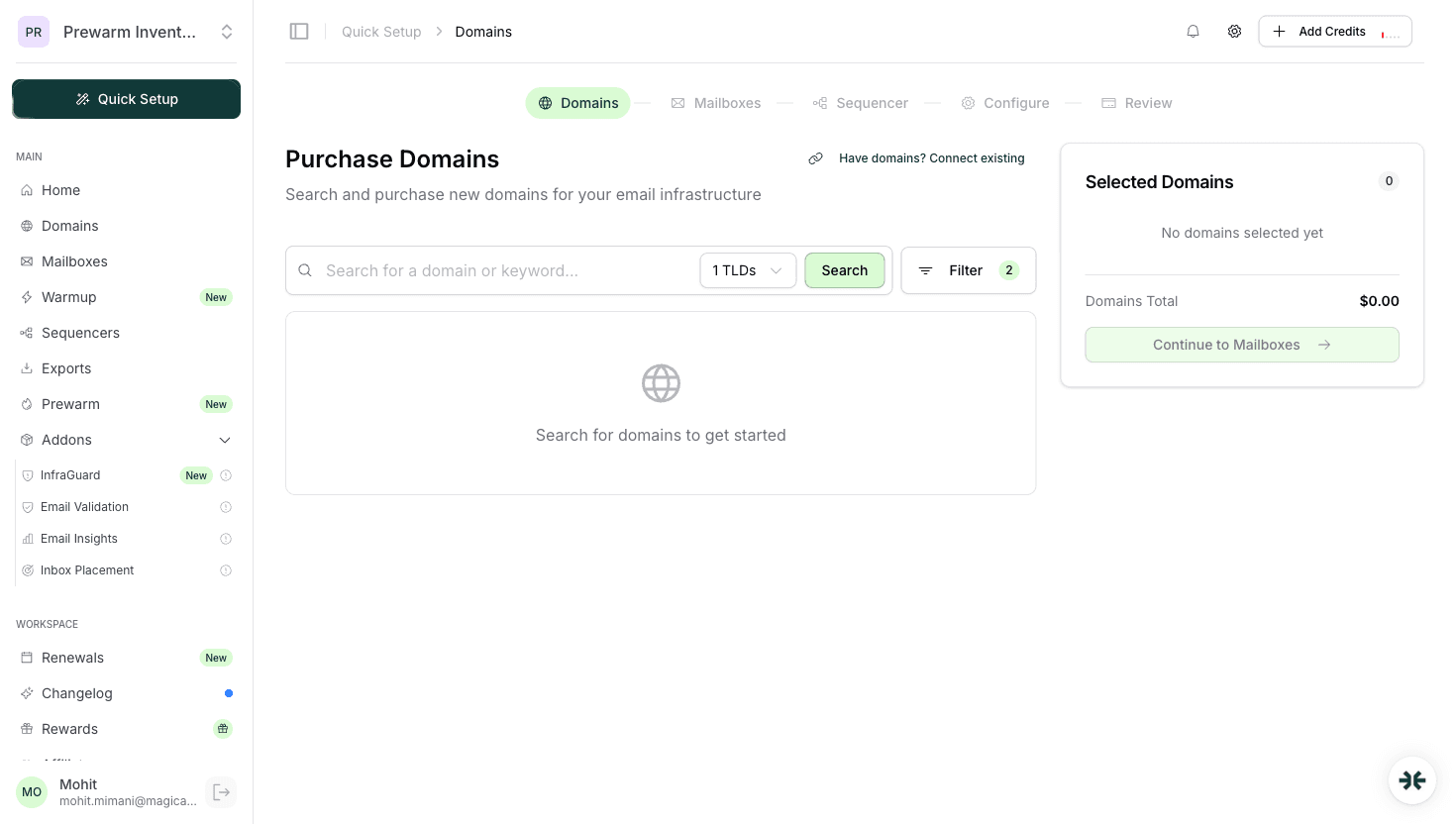
- 1Sign up for InboxKit (inboxkit.com) and pick a plan. For same-day launches, Agency at $99/mo for 30 mailboxes is the right sizing for most single-campaign launches. If you need to scale beyond that, Enterprise at $299/mo covers 100 mailboxes.
- 2Add billing and fund your wallet so domain purchases go through without a second payment step.
- 3Choose sender ESP: Google Workspace, Microsoft 365, or both. Default to Google Workspace for general B2B, Microsoft 365 for enterprise/legal/financial services targets, both for mixed lists or larger batches. See Google Workspace vs Microsoft 365 for cold email for the ESP matching decision.
- 4Bring your own domains or buy fresh through the provider. For same-day launches, bring-your-own is usually faster if you have unused domains already registered; if not, buy through InboxKit and pick .com TLDs where possible (.com has the cleanest reputation profile).
- 5Purchase pre-warmed mailboxes from the Prewarm Inventory section in the InboxKit dashboard. Pre-warmed mailboxes are sold separately at per-mailbox pricing based on domain age: $6/mailbox for 2-4 weeks of warmup, $7/mailbox for 4-8 weeks, and $9/mailbox for 8+ weeks, plus domain transfer costs (e.g. .com = $15). Inventory for pre-warmed Google Workspace is typically available for same-day handoff; pre-warmed Microsoft 365 may take up to 24 hours depending on capacity.
- 6Provisioning happens in the background. For pre-warmed inventory that is ready, the handoff is typically within 30-60 minutes of order. DNS records (SPF, DKIM, DMARC, MX) are configured automatically via Cloudflare in under 60 seconds at provisioning.
- 7Verify DNS is live once the mailboxes appear in the dashboard. All records should show green. If any are red, do not proceed. Fix DNS first.
Read InboxKit pre-warmed mailboxes for the full product overview and buy pre-warmed email accounts guide for the quality checklist to verify before handoff.
Hour 2: Connect Sequencer and Import List
With mailboxes in hand, the second hour is sequencer setup and list loading. InboxKit's native one-click exports make this step significantly faster than manual OAuth setup.
- 1Pick a sequencer: Instantly, Smartlead, Salesforge, Reply.io, Lemlist, Woodpecker, Saleshandy, Emailbison, ReachInbox, or SendKit. For same-day launches, Instantly and Smartlead are the fastest to onboard if you do not already have an account.
- 2Create a sequencer account and verify your login. Budget 5-10 minutes for signup and team setup.
- 3One-click export mailboxes from InboxKit via native integration. Select the pre-warmed mailboxes and push them to your sequencer account. OAuth handles the authentication automatically, so no app-passwords or SMTP hand-wiring.
- 4Verify mailboxes are connected in the sequencer. Each one should show as active and ready to send. Watch for any mailboxes that fail the connection test and retry.
- 5Upload the validated list to the sequencer. CSV import is the standard path. Map the fields (name, email, company) correctly.
- 6Configure sending rules: 20-30 messages per mailbox per day is the safe starting point. Set the send window (weekdays, business hours in your target timezone), and throttle the sequencer to avoid burst sending.
- 7Set up the sequence: subject, body, one follow-up at 3 days, optional second follow-up at 7 days. Short sequences outperform long ones on first-week campaigns because you have not yet measured reply rates.
- 8Add personalization variables: {first_name}, {company}, {industry} if you have it. Basic personalization is the minimum; avoid heavy personalization on same-day launches because you have not yet validated the data quality for it.
Read the cold email sequencer integration guide for longer onboarding instructions for each sequencer.
Hour 3: Pre-Send Validation
The third hour is the quality gate between 'campaign configured' and 'first send in the air.' This is where you catch the problems that would otherwise burn your mailboxes on day one.
- 1Send a test email to yourself from each mailbox. Verify the message renders correctly in Gmail, Outlook, and mobile. Check that DKIM and SPF show as aligned in the received-headers.
- 2Run Google Postmaster Tools spot-check. If your domain has Postmaster access, confirm the reputation signal for your sending domain is neutral or better. If Postmaster shows any red flags, pause and investigate. See Google Postmaster Tools guide.
- 3Inbox placement test. Send a dummy message from 3-5 of your mailboxes to a seed set of test accounts covering Gmail, Outlook, Yahoo, and corporate Exchange. Check where each one lands. Target: 80%+ primary inbox placement across the seed set.
- 4Review the first 10 personalized messages the sequencer will send. Read them out loud. Catch any broken variables, awkward name collisions, or personalization that does not make sense with the actual prospect.
- 5Verify the unsubscribe mechanism works: the reply-based unsubscribe link or footer should be functional. CAN-SPAM compliance matters even on same-day campaigns; Gmail will penalize senders without a working unsubscribe path.
- 6Confirm the monitoring layer is running. InfraGuard on InboxKit should be enabled (first month free) with 6-hour blacklist checks, DNS watch, and auto-pause on reputation drops. If you are not using InboxKit, set up equivalent monitoring before first send.
- 7Set reply detection routing. Make sure replies route to an inbox you are actively watching. Missed replies on day one of a same-day campaign are lost opportunities the campaign cannot get back.
Hour 4: Launch and First-Hour Monitoring
The final hour is launch and active monitoring of the first send wave. This is where speed matters less than staying attentive to early signals.
- 1Start the sequence in the sequencer. Turn the campaign active and let the first wave go out on the configured schedule.
- 2Watch the first 30 sends in the activity log. Confirm each mailbox is sending at its configured rate and not getting rate-limited. Expected send rate: roughly one message per mailbox per minute during business hours, depending on sequencer throttle settings.
- 3Check bounce rate on the first wave. Anything above 3% is a warning signal, likely a list data problem that slipped through verification. Anything above 5% is a stop signal; pause and re-verify the list.
- 4Watch for provider rate limits. Gmail returns 421 temporary deferrals; Microsoft returns 550 errors. If you see either, slow the send rate immediately. Pre-warmed mailboxes should not hit these, but same-day launches sometimes run the rate slightly too aggressive.
- 5Monitor blacklist status via InfraGuard. 6-hour checks run automatically; any hit on Spamhaus, Spamcop, or Barracuda triggers auto-pause and an alert. Respond immediately if alerts fire.
- 6Track inbox placement through the first 2 hours of sending. If the seed-set placement drops below 60%, something went wrong. Pause, investigate copy, investigate list quality, check for volume spikes.
- 7Log the outcomes: sends delivered, bounces, spam complaints, early replies. These are the metrics you will use to decide whether to scale the campaign on day 2 or pull it back for refinement.
- 8Watch replies in real time for the first 2 hours. Same-day campaigns often generate the highest reply rates in the first send window because the subject lines and copy are still fresh to the sender. Respond to replies immediately. Speed of response correlates with meeting conversion rate.
What Shortcuts Do Experienced Operators Use?
Experienced operators running same-day launches use a set of shortcuts that compress the workflow without cutting corners on quality:
- Pre-register domains in advance. Keep 5-10 unused .com domains in your account at all times. When you need a same-day launch, the domains are already aged and available, so you skip the 1-4 hour provisioning step.
- Maintain a first-draft template library. Three or four tested sequence templates for different ICPs and offers. On same-day launches, you pick the closest match and light-edit rather than writing from scratch.
- Keep a verified seed list of test accounts covering Gmail, Outlook, Yahoo, and corporate Exchange. Running inbox placement tests against the same seed set every time makes the signal comparable across launches.
- Maintain a relationship with your sequencer. Familiarity with Instantly or Smartlead's interface saves 30-60 minutes of onboarding time on same-day launches.
- Pre-build the InfraGuard alerting config so monitoring enablement is one click instead of a full setup flow.
- Have a bring-your-own-domain workflow ready. If you already own the domains, skip the 1-hour 'buy domains through the provider' step entirely.
The combined effect of these shortcuts is that experienced operators can launch in 2 hours rather than 4, and the quality gate is no weaker.
When Should You Avoid a Same-Day Launch?
Same-day campaigns are a short-term tactical move. They are not a substitute for the standard 2-3 week cold email setup process and should not be used as the default workflow.
Same-day is the wrong answer when:
- You have 14-21 days of runway. Self-warmup at standard pricing produces slightly better first-month inbox placement than pre-warmed and costs significantly less at scale. Use the runway.
- You are running your first cold email campaign ever. Rushing a first campaign in 4 hours means you will ship with untested list quality, unrefined copy, and no baseline for what 'good' looks like. The failure modes will be opaque.
- You need to send to 10,000+ prospects. Same-day launches are sized for 500-2000 prospect lists. Larger lists require more staging time for data validation, segmentation, and sequencer setup.
- Your compliance context requires documentation. Regulated verticals (legal, financial, healthcare) cannot run same-day campaigns because the audit trail for list sourcing, consent handling, and opt-out mechanisms needs verification time.
- You are scaling an existing program. Adding 30 mailboxes to an existing working campaign is a different workflow, staged, not same-day, because the new capacity should be warmed alongside the existing pool rather than dropped in all at once.
For the longer planning workflow read cold email infrastructure setup guide. For the decision between pre-warmed and self-warmup as a permanent approach, read pre-warmed mailboxes vs self-warmup.
How Much Does a Same-Day Cold Email Launch Cost?
The budget for a same-day campaign at 30 mailboxes and 1500 prospects:
| Line item | Cost |
|---|---|
| InboxKit Agency plan (30 mailboxes) | $99/month |
| Pre-warmed mailboxes from Prewarm Inventory (30 mailboxes at $6-9/mailbox depending on domain age) | $180-270 one-time |
| Domain transfer costs (e.g. 5 .com domains at $15 each) | $75 one-time |
| InfraGuard (first month free) | $0 |
| Sequencer (Instantly starter) | $37-97/month |
| List verification (NeverBounce, ~1500 rows) | $12-20 |
| Total first month | $403-561 |
At 1500 prospects across 30 mailboxes the send capacity is ~50 prospects per mailbox over the first 10 days, well within safe pre-warmed send rates. If you need to send to 3000+ prospects the correct move is Enterprise at 100 mailboxes for the subscription, with pre-warmed mailboxes purchased separately from the Prewarm Inventory at per-mailbox pricing.
Read InboxKit pricing for the full plan teardown and email infrastructure cost analysis 2026 for the longer cost breakdown across common scales.
The Bottom Line
Launching a cold email campaign in the same day is a legitimate tactical option when the launch date cannot move. The workflow hinges entirely on pre-warmed mailboxes from a disciplined provider with ready inventory, and on having list quality and message copy ready before the clock starts.
The 4-hour playbook: provision pre-warmed mailboxes (hour 1), connect sequencer and import list (hour 2), run pre-send validation (hour 3), launch and monitor the first wave (hour 4). Total first-month cost at 30 mailboxes is $403-561 including all the moving parts.
Same-day launches work but are not the default. If you have 14-21 days of runway, use it. The standard 2-3 week setup produces better outcomes on every measurable axis. Same-day is the emergency answer, not the strategy.
Frequently Asked Questions
Yes, in about 4 hours of focused work, provided you start with pre-warmed mailboxes, a validated list of 500-2000 prospects, and a first-pass message draft. Bare mailboxes cannot safely send cold email on day one regardless of how fast you work.
InboxKit with pre-warmed mailboxes purchased from the Prewarm Inventory section. Inventory for Google Workspace is typically handed off within 30-60 minutes of order, with DNS auto-configured via Cloudflare. Zapmail also offers pre-warmed mailboxes with a claimed 12 weeks of warmup, though its pre-warmed pricing is not publicly listed.
30 mailboxes is the right size for a 1500-prospect same-day launch. Below 30 the send rate is too slow; above 100 the setup complexity eats into the 4-hour budget. Scale later based on the first day's engagement data.
500-2000 validated prospects. Smaller than 500 and you cannot get statistically meaningful engagement data; larger than 2000 and you cannot validate deliverability before burning through the list. Verify every address through NeverBounce, ZeroBounce, or MillionVerifier before first send.
Launching with insufficient quality gates, specifically skipping list verification, inbox placement testing, or pre-send message review. These are the steps that catch problems before they burn mailboxes. A same-day launch that skips quality gates is a same-day mailbox graveyard.
No. Manual sends without a sequencer cannot maintain the send cadence, throttle, or reply tracking that cold email requires. One-click native exports from InboxKit to Instantly or Smartlead make sequencer setup the fastest part of the 4-hour workflow, so use them.
Related articles
InboxKit Pre-Warmed Mailboxes: Ship Same-Day Cold Email Infrastructure
Cold Email Infrastructure Setup: Complete Guide (2026)
How to Skip Email Warmup Safely: The Honest 2am Answer
How to Buy Pre-Warmed Email Accounts: The Honest 2026 Buyer's Guide
Ready to set up your infrastructure?
Plans from $39/mo with 10 mailboxes included. Automated DNS, warmup, and InfraGuard monitoring included.